Prepend a # to an outbound rule not allowed in V18

Status
Not open for further replies.

GerryGerry

Forum User
Joined
Aug 25, 2021
Messages
3
Reaction score
0
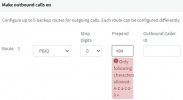
I have several 3CX instanses all running v16. I just built a v18 and am trying to setup up my outbound rules. One of my trunks reqires an account code enclosed in # to be prepended to the dialed number but this is no longer allowed. when I try I get the message

Can this restriction be over ridden or can someone suggest a workaround?Screenshot 2021-08-25 081209.jpg
 
Hi @GerryGerry,

I'd like to also know which SIP Trunk provider you're using?
 
Hi @GerryGerry,

I'd like to also know which SIP Trunk provider you're using?
The trunk is a custom trunk on an Asterisk based switch. It uses these prefixes essentially for billing purposes. The switch has been set up this way for over 5 years and would be extreamly dificult (but not impossible) to reconfigure. Why would the ability to prefix a # or a * be removed?
 
We have some 20 3cx installations all using # in the prefix on the outbound rule for our custom asterisk trunks, why remove functionality that people already have built in, so dont use it on the supported providers?!
 
Because users tend to copy-paste numbers into these fields along with special characters, and with most SIP Trunk providers, this 'breaks' the functionality because the include escaped ASCII characters.
We did this for the vast majority of users using supported SIP Trunks.

We'll take the comments into account and see if there is something we can do in a future update.
 
We actually remove it before it goes out on the trunk, its for billing/tracking purposes
 
We have some 20 3cx installations all using # in the prefix on the outbound rule for our custom asterisk trunks, why remove functionality that people already have built in, so dont use it on the supported providers?!
As a workgaround I have created the rule using *9* instead of #9# (which it allows) I then made a backup of the pbx using the builtin facility, downloaded the resulting zip, extracted the xml file edite the file by replacing *9* with #9# uploaded the modified zip file back to the PBX and restored the new backup. This seems to work OK.
 
Just an update on this, we have discussed this internally and decided to extend the validation of this field so that it also allows the '#' character.
 
Status
Not open for further replies.

Latest Posts

Forum statistics

Threads
111,977
Messages
590,098
Members
164,906
Latest member
Nari