


- Joined
- Oct 29, 2021
- Messages
- 2
- Reaction score
- 0
Hi, I'm am trying to add my 3CX Pro version to my Bitrix24 so I can receive inbound calls and make outbound calls.
(So this is not about making the 3CX INTERGRATION with Bitrix24. I already set this up and intergration is working fine)
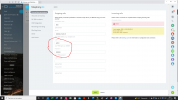
The problem is adding the (SIP) connection in Bitrix24 to 3CX.
I need to enter a username and password. But when I enter my management console login of my 3CX, Bitrix24 gives a response that the username is Unknown.
So in my opinion, 3CX is not accepting "admin" as the username.
My question is: which username and password from 3CX do I need to use?
See also the screenshot.
Hope someone can help me?!
(So this is not about making the 3CX INTERGRATION with Bitrix24. I already set this up and intergration is working fine)
The problem is adding the (SIP) connection in Bitrix24 to 3CX.
I need to enter a username and password. But when I enter my management console login of my 3CX, Bitrix24 gives a response that the username is Unknown.
So in my opinion, 3CX is not accepting "admin" as the username.
My question is: which username and password from 3CX do I need to use?
See also the screenshot.
Hope someone can help me?!


