Problem with Fanvil X4G Template

Status
Not open for further replies.

am12

Customer
Joined
Mar 12, 2020
Messages
17
Reaction score
2
We have some Fanvil X4G 2.12.1.7297 (current supported firmware downloaded from 3CX website) set up in direct stun mode.
Phone configuration, phonebook xml etc. are all correctly available from outside via https using the browser.
Phone provisioned and it is working correctly, I can do and receive calls.

The configuration template opened via web browser seems to contain entries for
<Auto_Pbook_Url>https://****/fanvil_phonebook.xml</Auto_Pbook_Url>
<Auto_Image_Url>https://****/firmware/fanvil/</Auto_Image_Url>

However these entries seems to be ignored from the phone.
Even if I import them by manually editing the fanvil xml cfg file, I don't see them when I export and download the cfg from the web ui.

As a result:
Firmware Update from 3cx doesn't work (just reboot the phone).
Phonebook doesn't update not even on phone reboot.
Reprovisioning from 3cx does nothing on the phone (e.g. I can change language/time settings but these changes do not reflect on the phone).

It seems to me that something is just not right with the configuration file that 3cx generates for this phone.

Any idea?
 
  • Like
Reactions: ewebster
Hi @am12

I tested this model just now:

- Phonebook was populated ("Contacts")
- Firmware is already updated, so the button will not do anything
- Changing settings like Language / Time does reflect when I press reprovision in 3CX

So unless you are using custom templates, or you are facing issues with the firewall, I think your phone should also work.

Have you tried installing an SBC near the phone and provisioning via SBC (after factory reset of course) just to compare?
 
I am not using custom templates (as far as I know templates get updated from time to time by your updater) and I can open the links in the cfg file from the same network of the client phone just fine so firewall doesn't seem to be the culprit (I doublechecked and there is nothing blocked there).
I do not have an SBC to test with currently.

My phonebook is populated just it doesn't update.
Firmware update showed the behavior this morning when the phone was using your prior supported version which btw was showing the same behavior since I installed it.
Changing settings and reprovisioning doesn't do anything.
I can however reboot the phone just fine.

Can you please export the xml config from the phone and see if these lines are in there?
<Auto_Pbook_Url>https://****/fanvil_phonebook.xml</Auto_Pbook_Url>
<Auto_Image_Url>https://****/firmware/fanvil/</Auto_Image_Url>

Are your links using https or tftp?

Factory reset doesn't seem to help either.
If it helps my phone gives the following configuration version: 2.0003

And this is the result of a txt export of the AUTOUPDATE CONFIG MODULE SECTION

<AUTOUPDATE CONFIG MODULE>
Download Username :
Download Password :
AP Pswd Encryption :0
Config File Name :****.cfg
Config File Key :
Common Cfg File Key:
Download Server IP :https://***/provisioning/***
Download Protocol :5
Download Mode :2
Download Interval :24
DHCP Option :0
Save DHCP Opion :0
DHCP Option 120 :0
PNP Enable :0
PNP IP :
PNP Port :0
PNP Transport :0
PNP Interval :1
Save Provision Info:1
Download CommonConf:1
Download DeviceConf:1
Check FailTimes :1
update PB Interval :0
Clr PB B4 Import :1
Trust Certification:1
Device Cert Mode :0
Auto Server Digest :0
Enable Auto Upgrade:0
Upgrade Server 1 :
Upgrade Server 2 :
Auto Upgrade intval:24


As you see there is no Auto Pbook Url or Auto Image Url section which is a fair indication that these features cannot work (how could they if they have no reference url in the config?).
Might they be dropped because https is not supported by the Fanvil cfg version?
Do you have other suggestions?
 
Hi @am12

I think there is some confusion here, allow me to explain in some more detail. There are two things in this conversation:

1. The config 3CX generates
2. The config backup the phone generates (as you mentioned above)

The first one is the only one that matters, the second one is entirely irrelevant and should be ignored. The reason being that the 1st file contains all the phone configuration, including the phonebook. The phone will automatically reload this configuration every 24hrs or when you hit the reprovision button. Each time it re-provisions, it will download the contacts file, and update its Local phonebook. This is why the things you see missing in the 2nd file are entirely irrelevant. The manufacturer designed and tested this configuration on 3CX, and I can confirm that it works on my end. So please ignore the phonebook for the moment, I think you have associated the fact that you saw things missing in the fanvil config.txt with the fact that the phone simply fails to reprovision and concluded that it may be the 3CX config that was somehow wrong.

However your description tells me a different story, that your phone is simply unable to reprovision. This is consistent with what you described originally:

- Phonebook will not update
- Languages will not update
- Time settings will not update
- Firmware update command does not respond

Please try the following solutions before you move any further

1. Take the phone off STUN, factory reset it and reprovision it on an SBC to compare behaviors
2. Try moving the phone to another location (different place, different modem ie. at home) and compare behaviors

You can simply change the language and hit "reprovision" after you do the above and see if provisioning works. If it still doesn't then at that point I would suspect that something else is happening and that would be the right time to contact your 3CX Partner.

Let me know if the above helps
 
I reset the phone and did autoprovision again. It all went through smoothly.
Phonebook updated, web admin password changed, language, time settings, call working ecc.
It all matches. This means that the phone has no issue during the first provisioning.

It just doesn't reprovision. The reprovision button does nothing and neither does the update interval.
I unfortunately don't have the chance to move elsewhere. However I tested two different connections and if the first provisioning goes fine, it's very hard to suggest that things would be different on a third connection or that there is some sort of communication issue on the second provisioning which should just work in the same way as the first.

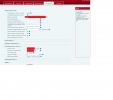
I don't know if it helps but if I go to the autoprovision setting in the X4G Fanvil interface and I just hit apply without changing anything from the 3CX cfg, I get "Please input server address".
However I see all fields correctly filled.

To me this still seems as a phone configuration problem.
 
  1. Thread title must be short and on point: ie. "One-way audio with my XYZ VoIP Provider" ;)
  2. Provide relevant information about your system which is relevant to your problem ;)
  3. Give an accurate description of the problem you are facing and what steps you took to reach it (how some else could replicate this). ;)
Some information about you system that is almost always useful is the following:

  • 3CX Version, Enterprise Annual 16.0.8.9 (latest)
  • Server OS, Debian 9
  • Is the 3CX Server Hosted and where? On Premise
  • IP Phone Make/Model/Firmware Fanvil X4G 2.12.1.7297
  • Provisioning Method: Local / VPN / STUN / SBC STUN
  • Trunk Provider or Gateway Make/Model Fortigate (FGT200D, guide and helpers setup checked)
  • Has the Firewall Checker passed: YES
  • Are custom Phone Templates being used: NO
 
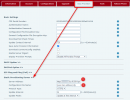
Can you also check the URL that appears in the phone interface, after the first provisioning is successful?

You can hide the FQDN name and random id and paste the rest

1. https://xxxxx.3cx.com:5001/provisionining/xxxxxxxxx/ This needs to be correct AFTER provisioning is done.

2. This should have your device MAC address that appears on the sticker on the back of the phone.

If either of these are wrong AFTER the initial provisioning, then all subsequent attempts at provisioning will fail like in your case.
1616775832383.png
 
1617001976757.png
Here it is. Main differences I see from yours is config version on top, different options in the top part and https:// missing from the server address even though I already tried to add https:// manually and it seemed to change nothing.
Server Address has the right uri after the / (it's concealed by the short input field).
If I copy the values and I test ServerAddress+CFG File Name in the browser the file loads.

I wonder why there are differences in the top UI part. I downloaded the firmware from the 3CX Website.
It should be the same. Perhaps my phone has some issue?
Could it be because it's X4G? Maybe this requires a different firmware?
 
Try to build the link and download the provisioning file from 3CX. You can do this by typing the provisioning URL you see in the 3CX management console for the phone, and adding the mac address.cfg at the end
ie. https://mycompany.3cx.com:5001/provisioning/xxxxxxxxxx/ABC12345678.cfg


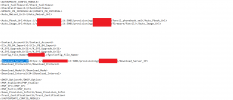
Open the file and check to see the what the value <Download_Server_IP> contains. For example is it like this?

XML:
<Download_Server_IP>https://mycompany.3cx.com:5001/provisioning/xxxxxxxxxx</Download_Server_IP>

or perhaps is it missing the https part like this?
XML:
<Download_Server_IP>mycompany.3cx.com:5001/provisioning/xxxxxxxxxx</Download_Server_IP>
 
Last edited:
It seems correct:

1617021104143.png
 
Well in this case, the phone does get populated with the right address, so there isn't much else to explain why the phone fails to reprovision after the first provisioning was completed..

How do you feel about installing an SBC and trying again just to compare?

You can install it on any of the below
- Raspberry Pi 3B+ or above
- existing Windows 10 PC
- a disused PC, using the 3CX ISO file
- a VM using the 3CX ISO file

I don't see many other options at this point..
 
Status
Not open for further replies.

Members Online Now

Forum statistics

Threads
111,834
Messages
589,287
Members
164,664
Latest member
dominik.pepel