• We do not provide troubleshooting help for unsupported phones. Please try with a supported phone.
  • V20 Update 10 Alpha 2 Learn more

Problem with Phone Firmware through 3CX Management Panel

Status
Not open for further replies.

PimvanD

Free User
Advanced Certified
Joined
Sep 17, 2019
Messages
61
Reaction score
15
Hello,

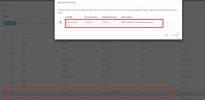
Having some issues with pushing firmware to our HTEK phones (924E)
See screenshots below.

3CX Version: 16.0.9
Linux Install

Not entirely sure where I can find extra info regarding this issue.


1.png11.png
 
Hello,

Can you login via a different browser and try again?

For example try both from latest Chrome and latest Firefox and tell us if you notice any difference
 
Hello JohnS,

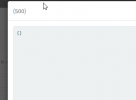
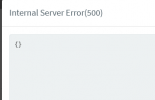
Same issue here aswell.111.png
 
If you go to your main dashboard and click on services, are they all running?
 
Yes, and I have restarted all of them earlier today with no difference.

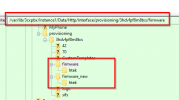
I have also checked the structure of the firmware directories which seem fine by me.
Though there is nothing in it at this moment, which shouldnt be a problem, cause 3cx should download them if "firmware button" is used.

Isnt there any particular logging where I can see more info about the 500 error?
1111.png
 
Actually this is a problem, your system thinks that it has the firmware but you said there is nothing in there.

You can do the following to recover

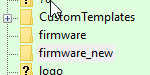
  1. Go inside "firmware" and "firmware_new" folders and make them completely empty
  2. Then go to Services and restart your management console service: "3CX PhoneSystem 01 Management Console"
  3. This will log you out. After 10 seconds when it has restarted, login and go to Updates
  4. You should now see the option to download firmware
  5. Click to download all the Htek firmware
  6. Finally, go to the Phones page and try to install the firmware again

The error should go away and you will get a message that the upgrade has started
 
1. They are completely empty
2. Done
3. Done
4. No firmware downloads available at the "updates" page.
5. Nothing to be downloaded, only the V18 upgrade.
6. ....


**EDIT**

Ill try to manually put a firmware in it to see if I can "fool" it.
 
Seems that putting the latest 3CX firmware fw920.rom for HTEK924E into those folders fixed it..

Still strange that my 3cx system doesnt know what to do with "empty" firmware folders..
 
Hi @PimvanD

I'm glad that worked, but unfortunately this is not the normal 3CX system behavior we would expect to see.

If the system is not showing you firmware in the updates page then I would suspect that something else was missing or had gone wrong.

- Do you use any custom templates?
- Is there an antivirus on the 3CX server or other software except 3CX running on it?
- How was the Htek provisioned exactly, did you follow this guide or was it done manually?
 
Goodmorning @JohnS_3CX,

No we are not using any custom templates. Just straight forward HTEK templates out of the (3CX) box.

There is no other software running like anti-virus or other software.

We provision via local lan -> provisioning link into the phones webpage.
 
Hi,

And how was the Htek provisioned exactly, did you follow this guide or was it done manually?
 
Also since this is a Linux install and you have made some changes in the firmware folders already, it's quite possible that you performed changes as "root".

If you by any chance changed the ownership or rights on those folders when you copied the firmware file in there directly, there is a chance that the 3CX system is now unable to read/write to those folders and this could prevent it from automatically downloading the correct firmware.

Can you check to see if the permissions and ownership are correct?

SSH in, go to /var/lib/3cxpbx/Instance1/Data/Http/Interface/provisioning/xxxxxxxx/ and then do an
ls -dl firmware*

They have to match my example below:

1629192680475.png
 
Ill come back to this tomorrow or friday
 
No problem, we can follow up later.

PS: I have added a UC924E on a V18 and can confirm that the firmware upgrade happens successfully so at least we know its not a general issue.
 
Alright looking good. Let's try the following:

1. Make a new extension, leave all the settings default
2. Go to the provisioning tab and add Htek UC924E
3. Type a fake MAC like 000000000000
4. Provisioning, leave it local
5. Press OK to save

Then, go immediately to your updates section and see if any updates appear for firmware
 
With the firmware & firmware_new beeing empty? As I "fooled" 3cx 3 days ago with putting it in manually
 
Yes, keep it empty so we can see if

a) Updates appear
b) Updates can download

I highly recommend restarting the management console service too, just to be sure it is aware that there is no firmware in the folders.
 
1. Firmware + Firmware_new folders emptied

1629452911735.png

2. Restarted mgmt console
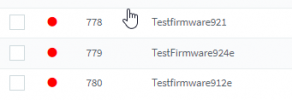
3. Made 3x new extensions with 3 different types 921, 924E and 912E

1629452755372.png

4. Good news is that 3cx does see other phones.

1629452782013.png

5 Bad news is: No 924E firmware
 
Status
Not open for further replies.

Forum statistics

Threads
112,149
Messages
590,964
Members
165,170
Latest member
SupportRock