Solved Problems with Audio

Status
Not open for further replies.
Hey there, CobaltIT. I know that 3CX recommends the SBC but really didn't want this specific request turn into a debate for or against the SBC as I'm sure that's been done to death somewhere on the forum.

I'm trying to do the Remote STUN method. It's one of the choices we have with 3CX and in this small office I'm trying to get it to work. Every other install we have done has been with SBC or VPN or local box. In this case a lot of the choices are about cost - the cost of the VPN at GCP each month or the cost of the SBC and the additional precautions one has to take to ensure it stays alive - it runs Windows....

At this point I have a phone that's working great but for some reason won't let me change the SIP port on the phone to anything other than 5060. I was hoping for some help with this... that'd be super.
 
So I’m assuming your lack of response to any of my questions mean you’ve done everything I’ve asked and it still doesn’t work?
 
Hi there, kieferschild

Apologies - yes - I thought that my replies were inclusive of yours and others' messages. I have gone through every one of your points and yes - it's all done. I've subsequently changed the RTP ports on the two Yealink phones so that the range only has 12 slots too.

To go through 'em to confirm:
Step 1
1) Phones all have static IP addresses. Can get the provisioning file just fine.
2) Each phone has a different SIP port and RTP range.
3) Each phone has the provisioning URL for its specific extension in the correct spot.
4) I have used the Draytek "Open Ports" utility to foraward the ports for each phone.
5) PBX delivers audio is enabled on all extensions.
6) SIP.ALG has been disabled on the router.
7) RTP ports are all 12 slots only now.

Step 2
Management console is set to incremented SIP starting at 5065
- RTP ports are 12 ports each.
- SIP ALG is disabled on the remote firewall.
- As per 2 above in the management console for each extension.

So everything appears to be working fine. There are no delays in audio when dialling from one extension to the other. The points you and others have raised have all been implemented and work well.

The only remaining issue is this one of SIP port on one of the phones. If I manually change it to 5060 on the phone (even though 5060 doesn't appear in the management console or in Open Ports for that extension) then the phone is perfect. If I go back into the phone web interface and change the port to 5065 which is what it's supposed to be, the phone immediately de-registers from the PBX. I don't understand why this is happening.

Many thanks to all who have responded with helpful tips.
 
You absolutely should not be changing the SIP port for the SIP SERVER. You did not change 3CX from 5060 right? So why are you trying to tell the phone to reach 3CX on 5065? Of course it won't register.

The port you chose for the extension is the port that extension will listen on for SIP traffic. That is why people have been telling you to port forward on the extension side. My head hurts from reading through some of this stuff but have you actually tried factory resetting the phone and re-provisioning AFTER you changed the ports?
 
  • Like
Reactions: YiannisH_3CX
Did you restart the 3cx from the terminal?

If you create a new extension and reprovision the phone does it work?

Is the phone on the latest firmware?
 
Did you restart the 3cx from the terminal?

If you create a new extension and reprovision the phone does it work?

Is the phone on the latest firmware?
Hi kieferschild

I have just factory reset the phone and re-provisioned it the way it's supposed to happen and .....
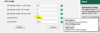
YES - it works. However, if I look at the phone web page under Account Settings, the phone is still set to port 5060. This is where I stumble every time. The provision page in the management console clearly says that the port is 5065 but the phone still says 5060.

I know I'm probably being so dumb here but can you explain to me why this is happening? Or is this normal - i.e. the PBX is using 5065 but the phone is using 5060??

Yep - the phone is on latest supported firmware according to the 3CX firmware list.

Thanks - Chris
 

Attachments

  • Yealink_Ext_Settings.jpg
    Yealink_Ext_Settings.jpg
    30.2 KB · Views: 5
You absolutely should not be changing the SIP port for the SIP SERVER. You did not change 3CX from 5060 right? So why are you trying to tell the phone to reach 3CX on 5065? Of course it won't register.

The port you chose for the extension is the port that extension will listen on for SIP traffic. That is why people have been telling you to port forward on the extension side.

cobaltit I think I just had a light bulb come on! So... the SIP port on the phone is used for the phone to send the data to the PBX and when the PBX sends the data back to the phone it knows (because we told it in the setup of the extension) to send it back to the phone on 5065?

Flipping heck - that took me a while! Sorry guys.
 
Honestly I'm not 100% sure that it uses that port for sending, but its definitely expecting the response from 3CX to come in to that port.

upload_2018-9-26_15-31-49.png
 
Hey everyone - thanks so much. I got there in the end with your help. Much appreciated.

I'll add a couple more extensions now on the same LAN at the remote location and see whether I can keep it working.

Thanks again - Chris
 
On the PBX side, 3CX is expecting to receive messages on port 5060 UDP (default). So, in the phone Web interface the SIP Server (Host) is correct as shown with 5060. You do not need to forward 5066, 5067, etc on the PBX side, just 5060.

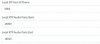
Local SIP port is different from Server SIP port.

Local SIP port is Local Listen Port.

Local SIP port can be found in the Yealink web interface under Settings -> SIP.

Local SIP port is the unique port you set in 3CX for each extension.

Server SIP port is the standard 5060 UDP that 3CX always uses.
 
Have you restarted the 3CX From the terminal?

Are you using the default t27p template to provision the phone?
 
On the PBX side, 3CX is expecting to receive messages on port 5060 UDP (default). So, in the phone Web interface the SIP Server (Host) is correct as shown with 5060. You do not need to forward 5066, 5067, etc on the PBX side, just 5060.
Peter I'm really glad now that I raised this question, even though it's resulted in some heads hurting <g>. There will be others, like me, out there who don't understand this and hopefully this thread will help someone else having the same bout of misunderstanding when it comes to what ports do what.

Thanks for your very clear reply.
 
@thames
Don't let other people on this forum make you feel bad for not knowing all the answers or for making mistakes. They forget that they were not born knowing everything and that it was once them asking the questions on forums to seek understanding.

Glad you worked it out in the end. I was on the exact same path as you, wanting to use the functionality that is built in instead of using a VPN or SBC. It took me a very long time to work out all the complications and I decided to document it all for myself. However, in the end it only worked 99% of the time, (for reasons unknown and I couldn't afford the time to figure it out when it only happened twice or 3 times a year) and that 1% downtime was unacceptable for the client, so we ended up using VPN which has been more like 99.9% reliable. The SBC was pretty good, but we had several issues over the years with 3CX messing up stuff on their end (licensing, FQDN, SSL, etc) which would make the SBC poo its pants and not recover, so we went for the VPN option an never looked back. You don't need to pay someone for a VPN service, just get the same router at both ends that can do OpenVPN such as pfSense (or many others out there nowadays).
 
  • Like
Reactions: thames
Thanks, Peter. Much appreciate the thoughts and info on VPN. Will certainly look at using VPN where I can. Makes absolute sense.
 
Status
Not open for further replies.

Latest Posts

Forum statistics

Threads
111,899
Messages
589,619
Members
164,765
Latest member
domi