Solved Provisioing XML can't be downloaded for HT802

Status
Not open for further replies.

dLinc

Silver Partner
Joined
Nov 4, 2024
Messages
7
Reaction score
2
Hi Guys, hope someone can help me on this one.

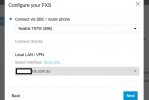
I was following this config guide https://www.3cx.com/voip-gateways/grandstream-ht-fxs/ but ran into some issues with getting the Ht802 online. We're testing to use the ata to connect to a PA system for paging.

Read through some of the posts here that said the HT802 must be registered through SBC, to be able to download the provisioning link.

I've done that, however Im still not able to save the provisioning link as xml or download it any where.

I've even tried to see if it was a browser issue on both Chrome and Edge and a Download setting issue. Nothing's worked.

Just need to download the XML so i can upload it to the ht802.

Not sure what I'm missing here.
 

Attachments

  • ht802 config dl.png
    ht802 config dl.png
    39.7 KB · Views: 11
  • Screenshot 2025-02-14 114758.png
    Screenshot 2025-02-14 114758.png
    26.9 KB · Views: 14
Hi,

1. Since the HT802 is connected via "Yealink T57W (998)" as its router, you need to make sure that this router phone is showing Green in the Voice & Chat page. If it isn't and we don't know the IP of the router, the config file cannot yet generate.

2. In case you've upgraded this machine to Update 5 Alpha, you need to upgrade to the latest BETA to get the full link that ends in .xml but if you are on Update 4 you can ignore this step.

3. Finally, since you are using an FQDN based link, make sure you can reach that PBX using the FQDN (don't log in using an IP for example)
 
Hi John,

Please see attached.

1. SBC phone is up and running
1739745948067.png

2. I believe we're still on update 4
1739745965304.png

3. Yes we are using FQDN for all queries and provisioing not IP.


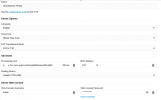
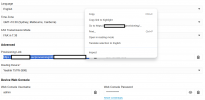
The Provisioning link is showing the .xml file, but I've got no way to save it as anything.
1739746290640.png

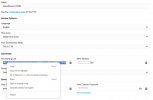
I only get the following options if the link is selected.
1739746607150.png


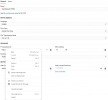
if unselected,
1739746776041.png
 
Please excuse me for asking such an obvious question, but have you tried simply pasting the link in your URL bar and hitting enter?
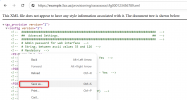
Chrome should be able to load it as an XML and then you can right anywhere on the page and click and "Save as"
1739779953906.png

It's just that you haven't really said what happens when you try to save the XML other that you were "not able to". (ie. Any errors, like a 404 not found? Or "File failed to download" or something more specific?)
 
  • Like
Reactions: bitn2
I have tried previously numerous time and kept getting a 404 even as I was writting my previous response... but just tried again and it's generated the XML file... seems like I must have done something wrong before.

Much appreciate your help.
 
  • Like
Reactions: NicholasP_3CX
Status
Not open for further replies.

Forum statistics

Threads
112,293
Messages
591,750
Members
165,422
Latest member
Subject1725