provision a phone and it show 3cx logo how to change it?

Song

Bronze Partner
Basic Certified
Joined
Nov 12, 2018
Messages
379
Reaction score
24
Hi,

When I provision a fanvil h5 phone somehow it automatically uploaded a 3cx logo into the phone called BACKGROUND.bmp. Is there a way to replace this in the 3cx server? or where is it getting the BACKGROUND.bmp form? I would like to replace that so when the phone provision it'll upload the replaced logo. Is it in the 3cx server? if so anyone know the directories or file I needed to replace? I tried to search the 3cx server with no luck.

thank you
 
Hi @Song,

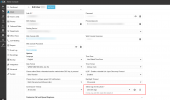
If you have a 3CX Enterprise Subscription, then yes you can do that by navigating to your Admin Console> Users > Phones Extension > IP Phone tab - then change logo for the phone, be aware thats available if the phone supports this feature .

1746812642505.png
 
Last edited:
Hi @Song,

If you have a 3CX Enterprise Subscription, then yes you can do that by navigating to your Admin Console> Users > Phones Extension > IP Phone tab - then change logo for the phone, be aware thats available if the phone supports this feature .

View attachment 47784
I have the 16 pro version. does that not have that function? Are you sure the Fanvil h5 phone will have that section for me? I thought only some phone will have that function. Is that the only difference between PRO vs Enterprise? Is it possible to upgrade my license from 16 pro to 16 enterprise? I don't think the fanvil h5 hotel phone are supported.
https://www.3cx.com/docs/ip-phone-background-logo/#h.yni98jubwihe


thank you
 
I have the 16 pro version. does that not have that function? Are you sure the Fanvil h5 phone will have that section for me? I thought only some phone will have that function. Is that the only difference between PRO vs Enterprise? Is it possible to upgrade my license from 16 pro to 16 enterprise? I don't think the fanvil h5 hotel phone are supported.
https://www.3cx.com/docs/ip-phone-background-logo/#h.yni98jubwihe


thank you
Yes you can upgrade, cost will be prorated. Yes you need Enterprise to provision the background from 3CX directly.
 
The ability to change the logo on an IP Phone has always been an Enterprise edition.

Now, for you to go from Version 16 to a Version 20 is a bit of a process.

You CANNOT go from Version 16 to a Version 20 directly. You will have to go through Version 18. Get a version 18 installer and restore your Version 16 backup to that.

You will have to define a System Owner in Version 18. Only then will you be able to migrate over to Version 20.

If you don't perform this intermediary migration, you will NOT be able to access your PBX when you move over to Version 20.

All I can say on this one is ... good luck!
 
  • Like
Reactions: Evolute IT
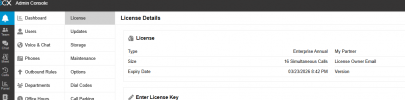
I have upgraded to Enterprise Annual subscription v20. But I do not see
Hi @Song,

If you have a 3CX Enterprise Subscription, then yes you can do that by navigating to your Admin Console> Users > Phones Extension > IP Phone tab - then change logo for the phone, be aware thats available if the phone supports this feature .

View attachment 47784
I have upgraded to the enterprise edition but I do not see the Screensaver Timeout or the Select Logo for this phone?
The ability to change the logo on an IP Phone has always been an Enterprise edition.

Now, for you to go from Version 16 to a Version 20 is a bit of a process.

You CANNOT go from Version 16 to a Version 20 directly. You will have to go through Version 18. Get a version 18 installer and restore your Version 16 backup to that.

You will have to define a System Owner in Version 18. Only then will you be able to migrate over to Version 20.

If you don't perform this intermediary migration, you will NOT be able to access your PBX when you move over to Version 20.

All I can say on this one is ... good luck!
I'm not using v16. The 16 is for 16 user connection. Im using the v20. I have now upgraded to enterprise edition but I do not see the logo page or the screensaver tineout
 
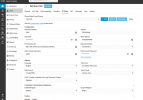
Here is a picture of what version i'm using and also I do not see the logo box to change it..
Hi @Song,

If you have a 3CX Enterprise Subscription, then yes you can do that by navigating to your Admin Console> Users > Phones Extension > IP Phone tab - then change logo for the phone, be aware thats available if the phone supports this feature .

View attachment 47784
I do not see the select logo for this phone? or Screensaver timeout? please advise.
 

Attachments

  • Screenshot 2025-05-10 073944.png
    Screenshot 2025-05-10 073944.png
    169.3 KB · Views: 15
  • Screenshot 2025-05-09 174051.png
    Screenshot 2025-05-09 174051.png
    30.5 KB · Views: 13
It seems that setting is not available on the template for those phones.
 
Anyway to add it?
 
@Song - here is the 3CX IP Phone Guide that shows all the IP Phones that we support, which allow for customizing the logo. With the H5, it is a firmware issue from Fanvil, as they did not provide the ability to change the logo from our Admin Console. I believe the Fanvil H5w has been updated, and it should work. Probably should reach out to Fanvil as they can tell you better what is possible with their phones. Thanks!
 
Last edited:

Members Online Now

No members online now.

Forum statistics

Threads
111,832
Messages
589,285
Members
164,662
Latest member
DejanMDS