Solved Provision Grandstream phone

Status
Not open for further replies.

smilar

New User
Joined
Jan 9, 2023
Messages
10
Reaction score
1
Hello, I am trying to test internal setup using StartUp account.

1) I setup new account and added couple users
2) I installed SBC software on Windows PC in the same LAN
3) the users can call each other on the web browser and mobile app
4) I am trying to add Grandstream GXP2160 phone to one user following this guide https://www.3cx.com/sip-phones/grandstream-gxp/
5) I am setting the phone as normal phone since I have SBC router software installed , but when it come to steps 2 in this guide "As soon as the phone boots up it will request Your extension number" <-- this is not happening. The IP phone is not requesting extension number.

What am I missing ??
 
Hi,

Make sure you are running our latest available firmware in case your phone has an older version (https://www.3cx.com/support/phone-firmwares/).

And then factory reset the phone, this will be necessary.

The phone will come up and after a few moments a login prompt should appear on the screen.
 
Thx for replying.

I just upgraded the phone firmware from the link above.
I deleted the old phone setup from the user.
I re-added the phone and got the pop up below.
I rebooted the phone from the phone web console

But still NOT asking about the extension/codes below.
 
Last edited by a moderator:
Sorry, had to delete the images because they were showing your private info.

The phone will need internet access in order to contact our provisioning server and get the config it needs.

Is there any chance your phone is plugged behind a network that doesn't allow it to do so? (perhaps a firewall issue for example)
 
nothing that I know about. The phone is getting a local IP and I am able to access its web interface.

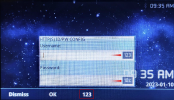
The only thing is coming up on the phone after restart is a popup asking for Http(s) ID/PW CONFIG, there is a Username and Password fields .

If I put the extension number and one time code its telling me invalid
 
The only thing is coming up on the phone after restart is a popup asking for Http(s) ID/PW CONFIG, there is a Username and Password fields .
That's literally it. If that pops up on the LCD screen, you need to type in your extension number and your one time code.
Make sure you are entering only digits, not alphabetic input.

The phone will take about a minute to provision itself and should be ready to go.

The code will also be sent to your user's email for that extension.
 
but its telling me "Wrong username and password" when I put the digits
 
Hi,

I just tried a 2160 on a StartUP system similar to yours.
In my case I was able to enter the credentials and the provisioning worked.
Just wondering whether your issue is perhaps due to a typo when entering the digits?


1673361748591.png

- Note that while I selected "123" as my input method, that only applies to the username.

- When I press the down arrow to type the password, I need to switch the keypad to "123" again otherwise I will end entering the wrong digits

Thought it's worth mentioning as it is a small detail that can sometimes be missed.
 
I did a factory reset again and tried and it worked. Thanks a LOT for all the support !!!
 
  • Like
Reactions: JohnS_3CX
Happy to hear! We will mark this as solved then
 
Status
Not open for further replies.

Members Online Now

No members online now.

Forum statistics

Threads
111,831
Messages
589,277
Members
164,660
Latest member
RJenkinsROCK