Provisioning 3cx App in local network

Status
Not open for further replies.

shamnad

Silver Partner
Advanced Certified
Joined
May 31, 2021
Messages
42
Reaction score
2
Dear Community,

I am planning for an 3cx v18 installation for one of my client.
Since they are too concerned about their network security, they are not ready forward the ports, instead of port forwarding they will provide vpn tunnels for the users. As per my previous experiences, 3cx app always using the fqdn for provisioning.
Is it possible to use the local ip instead of fqdn for 3cx app/client provisioning ??

Any support will be highly appreciated

Thanks
Shamnad
 
Depending on how your VPN is configured, the client may be able to use name resolution provided by the internal DNS server (split DNS). Alternatively, you can set the internal IP of the 3CX server in each remote workstation's "Host" file.
 
Where I can find the "Host" file ?
 
In Windows, C:\Windows\System32\drivers\etc\hosts. In *nix, usually /etc/hosts. Entries override DNS for that computer.
 
Split DNS is the answer. More easy to use than modify the host file.
 
On the setup of the vpn, can you set an dns record that points the fqdn internal 3cx ip address

you may be able to do this on the router, or point vpn dns to local dns server where you have configured spilt dns
 
Have you also tried starting the vpn, before starting the 3cx application. This way it may see the ip of the 3cx server
 
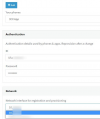
Just want to add that all our apps actually have both local(Local IP) and remote(FQDN) address configured. In most cases, the Local address value will depend on what is selected under "Network Interface" on the extension level:
1647593118498.png

If it is the local ip that is selected then the provisioning file should contain the local ip in the provisioning url too. That said, if this is already the case, making sure that the VPN connection is established before launching the 3CX app as @Saqqara already mentioned should be all that's required.
 
Status
Not open for further replies.

Forum statistics

Threads
111,974
Messages
590,083
Members
164,900
Latest member
Silent_Guru