With the removal of the configuration file for the legacy 3CX Phone app being removed from the welcome email in the next release, what will be the procedure for customers still using the legacy app?
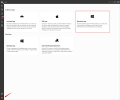
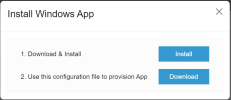
You will be able to download the configuration file by logging in to the WebClient with the extension that needs to be provisioned and go to Apps >> Click on the Windows App >> and you will get promoted with two options, to download the app or download the configuration file.
Are admins able to download this configuration file on behalf of other people? We typically set up peoples' extensions for them initially, then introduce them to the web client after a couple of days.
You are able to download the provisioning file on behalf of other people but do to so you will need to log in to each extension separately and download the provisioning file for each one.
Please note that the provisioning file is not used for the WebClient or the 3CX Desktop app but instead is used only for the 3CX Phone for Windows (Legacy app), meaning if your users are only using the WebClient or the 3CX Desktop app, downloading the provisioning file is not needed.