Provisioning file successfully generated, only 1 of 10 phones appear bound in Yealink RPS

harrylouskos

Silver Partner
Basic Certified
Joined
Aug 1, 2022
Messages
6
Reaction score
0
Hi All,

Long time reader, first time poster.

Whilst undertaking a migration to 3CX we noticed the phones we not binding to the Yealink RPS.

Initially, the provisioning file alerts in 3CX were failing, soon to pass post a firmware update.

Post the updates, the provisioning files were successfully generated, however still sign they were binding, save one of the phones which there is no difference in configuration.

We noticed the phones appear listed under PNP so we tried disabling the STUN option to no avail.

The phones sit behind a separate VLAN behind a Sophos XGS that sends voice traffic via IPSEC to our private cloud.

The phones appear to have the local vlan IP set in the public IP field, however we have other phones like this and have bound regardless.
 
Hi Harry,

We noticed the phones appear listed under PNP so we tried disabling the STUN option to no avail.
Don't use STUN - we do not support it, and no wonder since it doesn't work properly for most people

The phones sit behind a separate VLAN behind a Sophos XGS that sends voice traffic via IPSEC to our private cloud.
This is going to cause more problems than it solves, and luckily there's a much easier solution.

You might want to consider simplifying (use an SBC) rather than complicating (STUN+IPSEC+VLAN).
The Yealink RPS is not the issue here, you can safely ignore it in this particular instance.

1. Delete all the phones, and delete the custom STUN template you've created.

2. Install a 3CX SBC - in the same LAN as the phones so nothing like IPSEC or VLAN gets between them. Nice flat network so they can see each other.

3. Factory reset all the phones. They will now appear in PnP and you can start assigning them. They will take about 30 seconds to pull their config and reboot ready to use.

The SBC is your friend: https://www.3cx.com/docs/3cx-tunnel-session-border-controller/ Give it a shot with a single phone, and then move the rest over too once you're happy.

If you cannot use an SBC, you'll be fighting an uphill battle using the setup you mentioned above.
 
  • Like
Reactions: ivank
Hi JohnS,

The response is much appreciated.

I forgot to mention that the phones are all directly connected so currently acting as their own SBC.

I didn't end up creating a custom STUN template, just used the default.

Just correcting myself, when I said disable to STUN option, what I meant to say was disable the RPS box under Phones --> Options.
 
Ah I see, makes more sense now. Ok RPS can be left enabled, that wouldn't cause you any issues.

If the phones are models that support the router function, and also setup as such:
1756967540285.png
..then probably best to take them out of the IPSEC and voice VLAN. The PBX is expecting to see them connecting from your office public IP, but putting them on IPSEC will make them appear as local and this could cause issues. Essentially, someone would either go with router mode or IPSEC, but not both at the same time if you know what I mean.

Back to the main issue

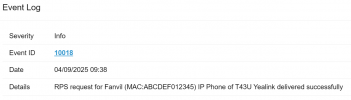
1. if you add a phone to 3CX (while RPS is on) you will see a message like so in your event log confirming it:
1756967956487.png

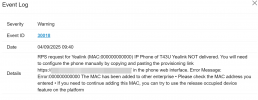
If the RPS rejects your MAC, you will also see message, possibly along these lines
(usually including the reason too)
1756968106393.png

2. Successful RPS does not mean the phone will provision - sometimes it won't because of DNS, or can't reach the internet, or it did not have the correct firmware installed prior to provisioning, or wasn't reset after the addition, or some other reason that prevents it from contacting your 3CX server to grab its config file.

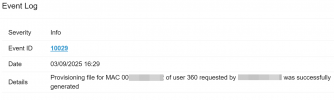
3. If it works though you will see confirmation that the phone with MAC so and so, from IP so and so got configured.
1756968353374.png

Router phones might reboot a couple of times during this procedure, this is normal.


Hope this helps clear things up a bit.
 
  • Like
Reactions: KyriacosS_3CX
Hi JohnS,

Within other clients sites, the yealink phones sit behind an IPsec as this is how we route voice traffic back to the servers and will have internet access to contact the RPS as well.

Within 3CX we can see the phones obtain a local address as you said which is correct, however they can still bind successfully.

At this site, we get successful provisioning alerts and the phones provision successfully however only one of the phones appear bound in the RPS.

I could try running one of the phones over the internet but I doubt that would make any difference because it goes out the WAN interface to contact the RPS regardless.
 
What is the issue exactly? That a single phone refuses to provision?

State the model and firmware number
 
Hi John,

The issue, is that the phones are provisioning successfully, however appear as unbound in the RPS.
 
How is that an issue exactly? RPS is simply the service that gives the phone it's provisioning URL the first time you connect it. They do not need to be "bound to RPS" like you say.

That is literally all it does. You could even skip using RPS by pasting the prov. link directly into your phone the first time.

I get a feeling that you mean something different. :p
 
harrylouskos You either use 3CX RPS and enjoy easy provisioning or switch it off and provision the phones using 3rd party software. But in the latter case "why the phones are not there" is the question for the enterprise RPS solution vendor.
 

Forum statistics

Threads
111,955
Messages
589,926
Members
164,857
Latest member
Luca Christiansen