- Joined
- Jan 10, 2016
- Messages
- 11
- Reaction score
- 0
- we installed V14SP2
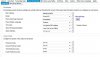
- we make a Phone Provisioning (screenshot attached)
- we make a Firmware update on the SNOM phone to the latest level: 8.7.5.35
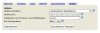
- we entered the URL from the 3CX "System Status page" to the SNOM web menü (scrreenshot attached)
- the SNOM phone booted two times - 3CX Background scrren apper - but the phone could not Register to 3CX Server
- the Logs files Show on the Server:
11-Jän-2016 21:52:35.898 [CM102001]: Authentication failed for AuthFail Recv Req REGISTER from 172.16.57.10:3072 tid=-tmr5laxexv0f Call-ID=313435323435373534333631333036-b1voavcr9hft:
REGISTER sip:172.16.1.5:5060 SIP/2.0
Via: SIP/2.0/UDP 172.16.57.10:3072;branch=z9hG4bK-tmr5laxexv0f;rport=3072
Max-Forwards: 70
Contact: <sip:[email protected]:3072;line=yea596dp>;reg-id=1;q=1.0;+sip.instance="<urn:uuid:76ee1144-35f9-4b52-8b4c-000413410873>";mobility="fixed";description="snom870";actor="principal";events="dialog";methods="INVITE,ACK,CANCEL,BYE,REFER,OPTIONS,NOTIFY,SUBSCRIBE,PRACK,MESSAGE,INFO";audio;duplex="full"
To: "Standger%C3%A4t B%C3%BCro"<sip:[email protected]:5060>
From: "Standger%C3%A4t B%C3%BCro"<sip:[email protected]:5060>;tag=bipr48nvrz
Call-ID: 313435323435373534333631333036-b1voavcr9hft
CSeq: 487 REGISTER
Expires: 120
Proxy-Authorization: Digest username="10",realm="3CXPhoneSystem",nonce="414d535c0ca4a71325:281d3bcef0bdf3a3ea06b60fc142c3f6",uri="sip:172.16.1.5:5060",response="9cb6f688a0f80234737a7a55d6c48be7",algorithm=MD5
Supported: path, gruu
User-Agent:
Allow-Events: dialog
Content-Length: 0
X-Real-IP: 172.16.57.10
; Reason: License limit, processing or network error
11-Jän-2016 21:52:35.897 Exception: SipMessage::Exception Empty header @ SipMessage.cxx:1296
11-Jän-2016 21:47:25.835 [CM102001]: Authentication failed for AuthFail Recv Req REGISTER from 172.16.57.10:3072 tid=-5fbinvvl5pmk Call-ID=313435323435373534333631333036-b1voavcr9hft:
REGISTER sip:172.16.1.5:5060 SIP/2.0
Via: SIP/2.0/UDP 172.16.57.10:3072;branch=z9hG4bK-5fbinvvl5pmk;rport=3072
Max-Forwards: 70
Contact: <sip:[email protected]:3072;line=yea596dp>;reg-id=1;q=1.0;+sip.instance="<urn:uuid:76ee1144-35f9-4b52-8b4c-000413410873>";mobility="fixed";description="snom870";actor="principal";events="dialog";methods="INVITE,ACK,CANCEL,BYE,REFER,OPTIONS,NOTIFY,SUBSCRIBE,PRACK,MESSAGE,INFO";audio;duplex="full"
To: "Standger%C3%A4t B%C3%BCro"<sip:[email protected]:5060>
From: "Standger%C3%A4t B%C3%BCro"<sip:[email protected]:5060>;tag=g7a8ei9pgo
Call-ID: 313435323435373534333631333036-b1voavcr9hft
CSeq: 485 REGISTER
Expires: 120
Proxy-Authorization: Digest username="10",realm="3CXPhoneSystem",nonce="414d535c0ca4a5dd64:1a85dab7a563520de37422ee7e770439",uri="sip:172.16.1.5:5060",response="5246aebbc0d3f49f47cf5b208d8b7f8c",algorithm=MD5
Supported: path, gruu
User-Agent:
Allow-Events: dialog
Content-Length: 0
X-Real-IP: 172.16.57.10
- on the phone only one entry appear:
REGISTER sip:172.16.1.5:5060 SIP/2.0
Via: SIP/2.0/UDP 172.16.57.10:3072;branch=z9hG4bK-z9c1jhcf8v0v;rport
From: "Standger%C3%A4t B%C3%BCro" <sip:[email protected]:5060>;tag=l1pdxsfkpt
To: "Standger%C3%A4t B%C3%BCro" <sip:[email protected]:5060>
Call-ID: 313435323435373534333631333036-b1voavcr9hft
CSeq: 469 REGISTER
Max-Forwards: 70
User-Agent:
Contact: <sip:[email protected]:3072;line=yea596dp>;reg-id=1;q=1.0;+sip.instance="<urn:uuid:76ee1144-35f9-4b52-8b4c-000413410873>";audio;mobility="fixed";duplex="full";description="snom870";actor="principal";events="dialog";methods="INVITE,ACK,CANCEL,BYE,REFER,OPTIONS,NOTIFY,SUBSCRIBE,PRACK,MESSAGE,INFO"
Allow-Events: dialog
X-Real-IP: 172.16.57.10
Supported: path, gruu
Expires: 120
Content-Length: 0
how could the SNOM device be different provisioniced from the 3CX Server? I did not know.
- we make a Phone Provisioning (screenshot attached)
- we make a Firmware update on the SNOM phone to the latest level: 8.7.5.35
- we entered the URL from the 3CX "System Status page" to the SNOM web menü (scrreenshot attached)
- the SNOM phone booted two times - 3CX Background scrren apper - but the phone could not Register to 3CX Server
- the Logs files Show on the Server:
11-Jän-2016 21:52:35.898 [CM102001]: Authentication failed for AuthFail Recv Req REGISTER from 172.16.57.10:3072 tid=-tmr5laxexv0f Call-ID=313435323435373534333631333036-b1voavcr9hft:
REGISTER sip:172.16.1.5:5060 SIP/2.0
Via: SIP/2.0/UDP 172.16.57.10:3072;branch=z9hG4bK-tmr5laxexv0f;rport=3072
Max-Forwards: 70
Contact: <sip:[email protected]:3072;line=yea596dp>;reg-id=1;q=1.0;+sip.instance="<urn:uuid:76ee1144-35f9-4b52-8b4c-000413410873>";mobility="fixed";description="snom870";actor="principal";events="dialog";methods="INVITE,ACK,CANCEL,BYE,REFER,OPTIONS,NOTIFY,SUBSCRIBE,PRACK,MESSAGE,INFO";audio;duplex="full"
To: "Standger%C3%A4t B%C3%BCro"<sip:[email protected]:5060>
From: "Standger%C3%A4t B%C3%BCro"<sip:[email protected]:5060>;tag=bipr48nvrz
Call-ID: 313435323435373534333631333036-b1voavcr9hft
CSeq: 487 REGISTER
Expires: 120
Proxy-Authorization: Digest username="10",realm="3CXPhoneSystem",nonce="414d535c0ca4a71325:281d3bcef0bdf3a3ea06b60fc142c3f6",uri="sip:172.16.1.5:5060",response="9cb6f688a0f80234737a7a55d6c48be7",algorithm=MD5
Supported: path, gruu
User-Agent:
Allow-Events: dialog
Content-Length: 0
X-Real-IP: 172.16.57.10
; Reason: License limit, processing or network error
11-Jän-2016 21:52:35.897 Exception: SipMessage::Exception Empty header @ SipMessage.cxx:1296
11-Jän-2016 21:47:25.835 [CM102001]: Authentication failed for AuthFail Recv Req REGISTER from 172.16.57.10:3072 tid=-5fbinvvl5pmk Call-ID=313435323435373534333631333036-b1voavcr9hft:
REGISTER sip:172.16.1.5:5060 SIP/2.0
Via: SIP/2.0/UDP 172.16.57.10:3072;branch=z9hG4bK-5fbinvvl5pmk;rport=3072
Max-Forwards: 70
Contact: <sip:[email protected]:3072;line=yea596dp>;reg-id=1;q=1.0;+sip.instance="<urn:uuid:76ee1144-35f9-4b52-8b4c-000413410873>";mobility="fixed";description="snom870";actor="principal";events="dialog";methods="INVITE,ACK,CANCEL,BYE,REFER,OPTIONS,NOTIFY,SUBSCRIBE,PRACK,MESSAGE,INFO";audio;duplex="full"
To: "Standger%C3%A4t B%C3%BCro"<sip:[email protected]:5060>
From: "Standger%C3%A4t B%C3%BCro"<sip:[email protected]:5060>;tag=g7a8ei9pgo
Call-ID: 313435323435373534333631333036-b1voavcr9hft
CSeq: 485 REGISTER
Expires: 120
Proxy-Authorization: Digest username="10",realm="3CXPhoneSystem",nonce="414d535c0ca4a5dd64:1a85dab7a563520de37422ee7e770439",uri="sip:172.16.1.5:5060",response="5246aebbc0d3f49f47cf5b208d8b7f8c",algorithm=MD5
Supported: path, gruu
User-Agent:
Allow-Events: dialog
Content-Length: 0
X-Real-IP: 172.16.57.10
- on the phone only one entry appear:
REGISTER sip:172.16.1.5:5060 SIP/2.0
Via: SIP/2.0/UDP 172.16.57.10:3072;branch=z9hG4bK-z9c1jhcf8v0v;rport
From: "Standger%C3%A4t B%C3%BCro" <sip:[email protected]:5060>;tag=l1pdxsfkpt
To: "Standger%C3%A4t B%C3%BCro" <sip:[email protected]:5060>
Call-ID: 313435323435373534333631333036-b1voavcr9hft
CSeq: 469 REGISTER
Max-Forwards: 70
User-Agent:
Contact: <sip:[email protected]:3072;line=yea596dp>;reg-id=1;q=1.0;+sip.instance="<urn:uuid:76ee1144-35f9-4b52-8b4c-000413410873>";audio;mobility="fixed";duplex="full";description="snom870";actor="principal";events="dialog";methods="INVITE,ACK,CANCEL,BYE,REFER,OPTIONS,NOTIFY,SUBSCRIBE,PRACK,MESSAGE,INFO"
Allow-Events: dialog
X-Real-IP: 172.16.57.10
Supported: path, gruu
Expires: 120
Content-Length: 0
how could the SNOM device be different provisioniced from the 3CX Server? I did not know.