Solved Provisioning Stopped Working

Status
Not open for further replies.

ct8916

Customer
Joined
Apr 24, 2020
Messages
27
Reaction score
3
Hello

I'm trying to provision Yealink T42G's by using the link in phone provisioning and pasting it on the phone UI 1679398397846.png

And then "Auto Provision Now". This used to work okay but has now stopped working it just returns to the page or logs me out and I can't log in and have to reset the phone. The phones firmware version is 29.83.0.145.

Any ideas?
 
  • Like
Reactions: Ronin
Hi,

*You need to press OK to save the URL first before you hit Autoprovision Now

Try deleting the phone from the extension, then factory reset it.

It should appear as a new phone in your Phones page in bold and you can select it from there, then click Assign Ext. on top to assign it back to your extension.

  • Make sure you don't have DHCP Option 66 on your network, it might be sending it to provision from a different destination.
  • Make sure your 3CX machine is on the same network as the phone, and uses only a single NIC to simplify. Disable or remove other NICs if they exist and are not being used.
  • If you use VLANs, that might be a problem in case something is misconfigured on the network.
  • In the extension settings when provisioning, make sure the Interface option is the IP of the PBX machine.
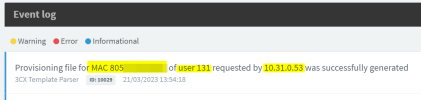
  • When you are done, check your Event Log after assigning the phone to see if the MAC of the phone appeared:
1679399717085.png
User = Your extension number
MAC = MAC of the specific phone
IP = that of the specific phone

If it doesn't appear then either the phone did not request it, or you have the wrong MAC defined, or the phone cannot reach the PBX.
 
Hello

Thank you. We haven't yet been able to get the phones to show up in the phones section until they're assigned via an extension hence why I do it the way I do.

The logs appear like this
 
Last edited by a moderator:
We don't know what those MACs and IPs are though, that's for you to know ;)
(removed for privacy reasons)

As for the phones not appearing, your ethernet switches may not be allowing multicast messages to travel from the phones to the PBX. This might be of help in case you want to address that: https://www.3cx.com/docs/plug-and-play-ip-phone/

Make sure the PBX is joined into 224.0.1.75 and if that is ok, then you have to look at why your network infrastructure might not be allowing those messages to flow. Also go through the checkpoints of my first reply, those are important too.
 
Last edited:
We don't know what those MACs and IPs are though, that's for you to know ;)
(removed for privacy reasons)

As for the phones not appearing, your ethernet switches may not be allowing multicast messages to travel from the phones to the PBX. This might be of help in case you want to address that: https://www.3cx.com/docs/plug-and-play-ip-phone/
Those are the phones I'm trying to provision - I just don't know why it couldn't be generated.

Yeah - I've added our network engineer to investigate that.

Should provisioning the phones via the link still work though? That's how we've been doing it until today.
 
It should, provided that

  1. The phone can reach the PBX
  2. The correct model and MAC has been added to your extension
  3. You are using our default templates the we have previously tested and confirmed working
  4. You are copying the provisioning link from that specific extension - not from another one
 
Also we saw earlier that config files for two different MAC addresses were requested at the same time from the same IP address.
That should not really be possible, so not sure what is going on there..
1679402144725.png
 
Thanks I think it was due to the MAC address being incorrect.
 
  • Like
Reactions: JohnS_3CX
Ok so provisioning now completed successfully?
 
  • Love
Reactions: JohnS_3CX
Status
Not open for further replies.

Members Online Now

No members online now.

Forum statistics

Threads
111,831
Messages
589,277
Members
164,660
Latest member
RJenkinsROCK