Provisioning Yealink Phones

Status
Not open for further replies.

green_trek

Joined
Aug 10, 2010
Messages
6
Reaction score
0
I have some T20p Yealink Phones and have managed to provision them correctly. The only thing I cannot work out is where the label field on the phone is set from. I can manually change this via the web interface but when you provision it - it replaced the label with just the extension number. Can this be set when auto-provisioning the phone?
 
You kind of lost me in this post.


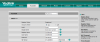
Here is a picture of my Yealink Setup. Which field are you saying keeps getting overwritten when provisioned?
 

Attachments

  • Capture.PNG
    Capture.PNG
    40.7 KB · Views: 699
You can edit the provisioning template for the Yealink T20 within 3CX. Settings - Provisioning Templates
In the section labled [acccount] - 'Label = %%extension_number%%' by default. I changed the label to be the first name of the user and so had 'Label = %%extension_first_name%%'
You will need to recreate the extensions afterwards so that the change is written to the extensions .xml file in the provisioning directory. Then just re provision the phones to make the changes.
 
Status
Not open for further replies.

Forum statistics

Threads
111,878
Messages
589,526
Members
164,729
Latest member
Depo Dore