Public ip change

Status
Not open for further replies.

orkhan_h

Free User
Joined
Jul 26, 2023
Messages
6
Reaction score
0
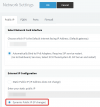
Hello! I need your help. I want to change public IP on 3cx server. As I know I should change it in Settings - Network - External IP Configuration. Is it all? And as I know it will take 24 hours to change it on system, yes? I will be grateful if you help.
 
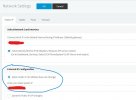
If you have a dedicated installation (you host your own server) then set the system to Network > Dynamic mode from the management console and it will happen automatically after some time.
 
If you have a dedicated installation (you host your own server) then set the system to Network > Dynamic mode from the management console and it will happen automatically after some time.
No, not dedicated. I did it before, I just don't remember how long does it take. As I remember it takes 24 hours. I just want to be ensure before begin
 
If its hosted by us, you won't have this option.

If you host your own dedicated server its exactly where you said it is:
1690461807313.png
 

Attachments

  • Screenshot 2023-07-27 164606.jpg
    Screenshot 2023-07-27 164606.jpg
    59.2 KB · Views: 32
It's 5mins for Enterprise licenses, and the rest will take upto 6 hours (depending on ISP could be shorter longer)
 
  • Like
Reactions: orkhan_h
It's 5mins for Enterprise licenses, and the rest will take upto 6 hours (depending on ISP could be shorter longer)
Great! Thank you for your support!
 
It's 5mins for Enterprise licenses, and the rest will take upto 6 hours (depending on ISP could be shorter longer)
Hello again. I did it, but it's nearly 20 minutes, it doesn't work. I have enterprise license.
 
Hi @orkhan_h as mentioned before by my college, if you have a dedicated installation set the IP as dynamic, apply the settings then you can restart the 3cx database server, this will force the system to detect the new public ip.

Once done go to settings --- license and click on refresh license key.

The IP will be updated to the fqdn, bear in mind that you will need to delete your dns cache and clean your browser too.
 
Hi @orkhan_h as mentioned before by my college, if you have a dedicated installation set the IP as dynamic, apply the settings then you can restart the 3cx database server, this will force the system to detect the new public ip.

Once done go to settings --- license and click on refresh license key.

The IP will be updated to the fqdn, bear in mind that you will need to delete your dns cache and clean your browser too.
I restarted all servises on the server. As I understand it's not enough, I should restart the server anyway?
 
Status
Not open for further replies.

Members Online Now

Forum statistics

Threads
111,831
Messages
589,277
Members
164,660
Latest member
RJenkinsROCK