- Joined
- Jun 7, 2021
- Messages
- 1
- Reaction score
- 0
Hi guys,
Our management console are error log when got incoming call :
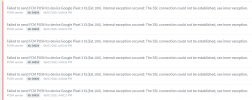
Failed to send FCM PUSH to device Google Pixel 3 XL(Ext.100). Internal exception occured: The SSL connection could not be established, see inner exception.
PUSH sender ID: 50020 06/07/2021 x:xx:xx PM
I pass the firewall test :
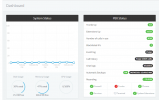
Outgoing call works fine. Incoming call cannot push 3CX andriod client.
Thank you any advice.
Our management console are error log when got incoming call :
Failed to send FCM PUSH to device Google Pixel 3 XL(Ext.100). Internal exception occured: The SSL connection could not be established, see inner exception.
PUSH sender ID: 50020 06/07/2021 x:xx:xx PM
I pass the firewall test :
Outgoing call works fine. Incoming call cannot push 3CX andriod client.
Thank you any advice.
- 3CX Version, Standard Annual 16.0.8.9
- Server OS, Debian_9_08_64
- Is the 3CX Server Hosted and where? Aliyun (China location)
- IP Phone : Google Pixel 3 XL , with andriod 3CX client Version 16.7.6.105
- Provisioning Method: STUN
- Trunk Provider : HK
- Has the Firewall Checker passed: YES
- Are custom Phone Templates being used: NO