PWA uses Windows default sound input, not the 3CX mic setting

SteveITS

3CX MVP
Silver Partner
Advanced Certified
Joined
Jun 20, 2018
Messages
4,428
Reaction score
2,159
A coworker and I noticed this today. He uses the PWA from Edge and I use Chrome PWA, and two different headsets. This is a relatively new symptom, as in, he thinks it was fine last Thursday. (my default in Windows was the headset mic so harder to say when it started for me)

To sum up, with 3CX PWA set to use a headset as the Microphone setting, the PWA is actually using the Windows default mic setting.

We can replicate this:
  • set Windows to use the headset mic
  • start a call, verify headset mic is being used
  • park the call (to let go of the audio)
  • set Windows to use the webcam mic
  • pick up the parked call
  • the call is now using the webcam mic even though 3CX is using the headset
Or phrased differently, set Windows to use the webcam mic, start a call in 3CX PWA, and it will not use the headset mic as configured.

I'm wondering if there was some Chromium update to trigger this? Looking to see if others have noticed...

3CX v20u6.
 
One PC is Windows 10 and the other is 11.
 
Hi @SteveITS ,

Any chance of having the Chrome/Edge versions, with which Windows version each one goes?
 
11/Chrome was: Version 139.0.7258.155 (Official Build) (64-bit).

When checking that, it updated to Version 140.0.7339.81 (Official Build) (64-bit), same issue.

My coworker is on site today, I will post that info later.

Also to be clear this does not occur with the speaker setting, just the mic.

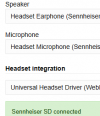
settings:
1757426626569.png

My coworker has a Yealink headset.
 
Coworker with 10/Edge was able to check. He sent me, "Version 140.0.3485.54 (Official build) (64-bit) but it just updated. The behavior is the same though."
 
Is it possible to confirm that this was no how things worked, at least at a certain point in the recent past?

Chrome will follow windows Default if an audio device is disconnected, and not revert back when it get's plugged in again - but if I understand correctly in your case the headset mic is available all the time, never get's disconnected?
Chrome (and Edge and possibly others) sound like they have a trigger (now?) to just follow win Default device any time it changes.

Regarding speakers, you had another speaker type connected, performed the same steps and that remained anchored properly?
 
We're not exactly sure when it started, but, on my coworker's PC we told him Monday it sounded like he was using a speakerphone. (he was off Friday). Troubleshooting led to replicating the above on both our PCs. Since his default mic was (apparently has been) his webcam it seems like this is relatively new. Nothing has changed hardware wise for either of us in a long time. The closest I've come is updating to Windows 11 24H2 a month or two ago, but of course that is irrelevant for Windows 10.

In both cases the headset mic remains available and we're using [the headset speakers] for the call audio (3CX speaker) output. We're just clicking the radio button in Windows Settings and parking/unparking the call (which connects the audio streams) to see PWA switch to the other mic.

In my case I have another set of speakers used for 3CX ringing and Windows audio default, however, my default mic has always been the headset. Monday I tried but could not replicate the problem with the speakers...audio stayed with the headset.

Also to be clear [to readers] the audio setting in the PWA doesn't change, it's just that it uses the mic set in Windows instead.
 
Last edited:
  • Like
Reactions: KyriacosS_3CX
Thank you for the added detail. We are looking to see if a chromium update changed something here.
 
I don't know if it's related, or not, but from around the same time we've also had a few instances of the PWA not connecting to audio until the PC is rebooted. Again on my PC, I can hear the headset speaker activate (faint hum) but *777 has no audio and I cannot hear or talk to a caller. Although I normally leave it open, I happened to have closed the PWA for the weekend, and after I opened it this morning I still had to reboot.

Maybe Windows CU related? However that would have been installed after my initial report above.

Edit: I don't use Chrome so it wasn't left running. And my coworker above tells me he reverted to the deprecated Desktop App because he had trouble with the mic selection.
 
Last edited:
We know that if you unplug an audio device that was configured on the PWA as prefered it drops to windows default (as it should) and then stays there even if you plug it in again - as windows does not directly inform the PWA that the same device is back.

What you are describing is not as I understand it the same. If the app is running normally and Windows default audio device changes via settings (all devices remain available) the app audio jumps to the new default instead of its own configured device.

What if the configured device is not the default to start with?
 
Sticking with my original report, that does sound different. The headphone and webcam stay connected.

> What if the configured device is not the default to start with?

That's my coworker's scenario...he originally had Windows set to use the webcam mic, and the PWA set to use his headset mic (Yealink in his case). But the PWA was using the webcam.

Just now I tried again on my PC:
  • Change Windows default mic to webcam
  • Close and reopen PWA
  • PWA still shows headset mic selected
  • *777 or other calls use webcam mic (easy to tell, if I rub the mic)
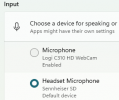
I'm changing this in Windows:
1758638580119.png
It's like the PWA is just ignoring its own setting.
 
And we are talking update 6? Just so I can see with my own headset and cam on the same PWA.
 
Hi,
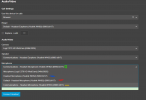
Without being 100% if this will help answer your question, here is how my setup looks. The Green circle is my last selected device, so we can skip over that line.

Starting at the very top, "Use this device for calls". If you have another logged in "device", could be different browser etc on the same PC, and that has other audio settings - the call will go via that "device" and use whatever settings it has, ignoring what the PWA is set to. So Unless we are sure which device is actually placing the call, we will get into a bit of a mess.

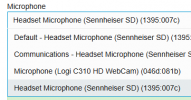
Then the Microphone selections. As you can see the headset appears 3 times.

Expectation:

Blue: Directly talk to the headset, bypass windows, do not collect 200M
Red: Windows Default microphone - if the default microphone in windows is changed, we follow along.
Yellow: Windows default Communications microphone (Win11) - a second default used for comms apps like 3CX, viber and similar. In case we have two mics and we want one for chatting with friends and another for presumably something else. Again if we choose this option and it changes in windows, we follow.

1758695261320.png

Now, can you check, when you are getting a phantom switch and the PWA seems not to be following what you chose but going via camera for instance and not the headset, is it really using just the cam, or both?
 
3CX v20u6.

Expanding the dropdown, the last one is selected in the PWA, which should be your blue:
1758725035430.png

We can tell it's not using the headset because one gets the "speakerphone"/reverb effect on a call, gently tapping or rubbing the webcam mic makes noise, and tapping the headset mic does not. Reverse that when using the headset mic.

To be fair, 99% of people would probably never notice if they use their headset as their default, as I do. I only noticed trying to replicate the problem. I have changed this PC to the webcam mic for a Zoom call with others in the room but then change back to the headset after and of course I'm not on a 3CX call at that time. As I understand it my coworker says his set up (Windows->webcam mic, PWA->headset mic) been his default and he's used the PWA for a long while now, but I will post if that's incorrect.

And to be clear we updated to u6 the first week of July so it's been a couple months.
 
I wrote a long message while discussing this with the coworker, and how his PWA (Chrome or Edge) started using a third mic, but we ended that we think we found a clue. I can replicate on my PC, though slightly differently, but we think we know why or at least how.

If I make a call on my PWA it uses the headset mic as above.

If I open Chrome on the same PC, I'm already logged in to 3CX (because, Chrome PWA), and if I unpark the same call there it switches to the webcam mic.

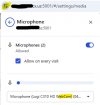
The Chrome site settings have a microphone setting:
1758731527573.png
...for some reason on my PC the Chrome web client seems to use THAT setting and not the 3CX Audio/Video setting in the web client (which is set to the same headset as the Chrome PWA).

We think it's going to be a similar answer on his, although we had to abort testing for now. It's unclear yet why his PWAs are using that site setting and my PWA isn't (only my web client). But this could help explain the mic selection and inconsistency. Also unclear is why/when it became set that way in Chrome. (he didn't check Edge today)

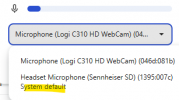
That dropdown expanded has only two choices with the latter being marked "default":
1758731799864.png
Of note, if I change the Windows default the choice in Chrome does not change, but the "system default" labeling moves to the webcam mic.
 
Yet another update....

It seems viewing the setting changed my mic to the webcam. Since there is no "OK" in that Chrome window, probably the X or (<-) buttons save, or maybe closing the dropdown. I had to change it back.

Coworker reports similar...after changing that mic setting to his Yealink headset, his PWA is now honoring that setting.

So it appears that setting overrides the setting in the PWA/web client.

It occurred to me, on rare occasions I have disconnected the headset to take to work if I will be in the office for an extended time, though usually I use the mobile app. So technically, it could have been disconnected, however, I have rebooted and likely powered off many times since then. I don't specifically recall the last time I did, maybe in 2024. But, I probably didn't shut the PC down first.

Edit: it would be nice if Chrome had a "use Windows default mic" setting but apparently it does not. Though this setting doesn't explain the prior observed behavior of changing Windows default also changed the mic used.
 
It's like a "quantum microphone" where if you observe it the result changes. ;)
 
Hi,

I have been playing a bit of "chase the mic" too, and with your info above we should be able to take a much closer look at things, and at the very least discount the headset brand as a variable that needs to be looked at.
 
  • Like
Reactions: SteveITS
Edit: it would be nice if Chrome had a "use Windows default mic" setting but apparently it does not. Though this setting doesn't explain the prior observed behavior of changing Windows default also changed the mic used.
I think at that point Chrome might have had "Default" as it's choice - not a specific device, therefore following those changes. Just a though on this point.
 
> PWA not connecting to audio until the PC is rebooted

FWIW I had this happen again today.