PWA vs Windows desktop app

Status
Not open for further replies.

Clint Reed

Silver Partner
Advanced Certified
Joined
Oct 26, 2017
Messages
60
Reaction score
13
Hello All,

I updated a few servers last night to build 461 aka v18 build 3 hotfix 1. A client report a pop-up message that shows the WebClient is being depreciated and ask to install PWA or the windows desktop app.
1. Is the web app going away in the future?
2. What is the difference between the PWA and the windows client? Look the same to me. Will admin creds be requested for either?

Thanks
Clint
EasyIT
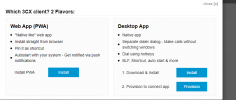
 
1649279262506.png

Here is the pop-up they are seeing.
 
They get told that at login to the web client? I've never seen that.

The "Windows Client" is from v16 and isn't being developed, but still works.

The "Desktop App" was new in v18(.0) and is installed in AppData so no admin rights needed.

The PWA is new and is the web client encapsulated to run independently of a browser: https://www.3cx.com/blog/releases/v18-update-3-final/

I have read zero about the web client going away.

Were they using and talking about the Chrome plugin, maybe? That is going away: https://www.3cx.com/blog/releases/chrome-edge-extensions-beta/
 
  • Like
Reactions: ChrisC_3CX
There are no plans to deprecate the 3CX Webclient so, as @SteveITS said, it may very well be the chrome extension you're thinking about.

To get the pop-up you show you have to click on the install client button on the left:
1649317337938.png


2. What is the difference between the PWA and the windows client? Look the same to me. Will admin creds be requested for either?
The PWA is essentially exactly the same as the Webclient but runnin as a browser app. The 3CX Desktop App is again the webclient as a native Windows app but does have some differences such as the dialer being an independent window. Regarding admin rights to install, they should not be required no.
 
  • Like
Reactions: Evolute IT
Status
Not open for further replies.