QR Code Does Not Scan

Status
Not open for further replies.

cambrio

Premier Customer
Joined
Jun 25, 2021
Messages
5
Reaction score
0
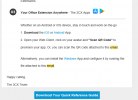
Trying to follow the directions listed here does not work, the QR code is not recognized in the app.

1638201543038.png
 
What device model, what app (Android/iOS/Windows), what OS version, what version of the client and what version of the PBX.
 
Last edited:
To add to what my colleague asked, if your 3CX Server is installed on-premise and you are currently on the Wifi, try disabling WiFi, enabling Mobile Data and scanning again (assuming that your HTTPS port is forwarded from the outside to your 3CX Server).

The reason for this is because the QR points to your FQDN which points to your Public IP, and a lot of Firewalls do not allow "hairpin" connections from inside the network to the Public IP.

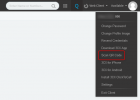
Alternatively, what you can try is log into the WebClient from your PC using the LAN IP (https://<LAN IP of 3CX Server>:5001/webclient), ignore the warning, the scan the QR code from the WebClient . FYI, the credentials for the WebClient should be in the same email you received.
1638267158652.png
 
Status
Not open for further replies.

Members Online Now

Forum statistics

Threads
111,832
Messages
589,278
Members
164,662
Latest member
DejanMDS