Solved QrCode doesn't appears in the Email Invite 3CX

Status
Not open for further replies.

Ricardo Ripritec

Customer
Intermediate Cert.
Joined
Dec 17, 2019
Messages
12
Reaction score
0
Lately every email invite sent in the various 3CX Instances doesn't appears in the attached files in the email.
I tried in many providers too and the file QrCode is not sent.
Anyone knows if lately the QrCode file isn't sent in the email invitation ?
 
Lately every email invite sent in the various 3CX Instances doesn't appears in the attached files in the email.
I tried in many providers too and the file QrCode is not sent.
Anyone knows if lately the QrCode file isn't sent in the email invitation ?
Hi Ricardo,

To which email that you sent a Welcome email invite?

In case this helps, can you try a Gmail account to send a Welcome email?
 
Default 3CX, but I'll try the anothers and report.
Thxs
 
hi,

What is your PBX server (Linux or Windows) and version?
 
Hi , Linux Debian 9 on Azure
 
Version 16.8.9
 
And Debian 10 Version 18 I've made some tests and in the ICloud on Iphone the QrCode is attached. Ithink the problem is the Outlook - Office 365 restritions
 
Hi @Ricardo Ripritec,

To clarify, which SMTP server are you sending email from? You can check this in Settings >> Email. Are you using the Office365 option?
 
Hi I've been using the native 3CX settings
 
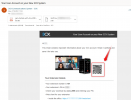
Assuming you are on the latest Update of 3CX, so most likely V16 Update 8, what do you see in the Welcome Email that you receive?
It should look something like this:
1626705352681.png

Don't you see anything in the location that I have highlighted?
 
Ok now is inserted in the body email , sorry for the inconvenience thanks so much.
Best Regards
 
Hi @Ricardo Ripritec,

Glad to hear that you've found the QR code. If you require any further assistance, feel free to open a new thread!
 
  • Like
Reactions: Ricardo Ripritec
Status
Not open for further replies.

Forum statistics

Threads
112,025
Messages
590,368
Members
164,978
Latest member
FringeIT-Eric