Queue calls on extension

Alphabetic

3CX MVP
Silver Partner
Advanced Certified
Joined
Jul 1, 2016
Messages
6,561
Reaction score
2,573
Hi guys

is there a way to queue up a call on an extension thats on the phone?

apart from accept multiple calls is there a way?

apparently this old NEC system can do that and will need some sort of replacement for this feature.
 
Status available, if extension is Busy or not Registered and forward calls to ... system extension ... call queue ... is no option?
 
  • Like
Reactions: paulodagraca
With Version 20 you can have agents to be polled even if they are on a call already.

You will need to have the option on the agent to accept multiple calls, but also the option in the queue active

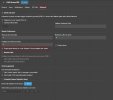
1728458953493.png
 
Thanks guys.

this is specifically for when the receptionist transfers calls directly to an extension. I cant remember what the term was but they basically stack a call up on an extension.
 
Thanks guys.

this is specifically for when the receptionist transfers calls directly to an extension. I cant remember what the term was but they basically stack a call up on an extension.
That would be the accept multiple calls. It is Call waiting with a different label.
 
Alternatively, you can create a "personal queue" for each user. The receptionist would transfer the call to the queue, rather than the user's extension, and the only member of the queue is the single user.
 
  • Like
Reactions: paulodagraca
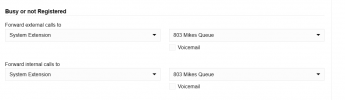
I had this working at one time. I have queue (x803), and would set up forwarding as below:

Step 3: Route the Extension to the Queue

  1. Go to Extensions in the Management Console.
  2. Select the extension you want to route.
  3. Under the Forwarding Rulestab:
    • Set “Available”, “Away”, or “Do Not Disturb” status rules to forward calls to the Queue Extension Number.
    • Example: Forward all external/internal calls to Queue 800.
But now, Queue extensions no longer show in the dropdown, and cannot be entered directly...???
 
  • Like
Reactions: paulodagraca
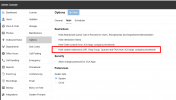
OK...thank you Chat! (Co-pilot in this instance). I had "Hide System Extensions set, which I did a while ago:
  1. Disable “Hide System Extensions”:
    • Go to SystemOptionsApps tab.
    • Make sure “Hide system extensions” is unchecked.
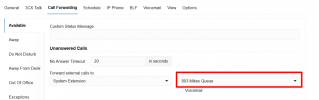
Now available!!!

1751019946263.png


1751019545460.png
 

Attachments

  • 1751019478444.png
    1751019478444.png
    31.9 KB · Views: 2
Last edited:
Hello Alphabetic,


Before me fxbastler and NicholasP_3CX and VoIPTools and mdak all have responded with great sollutions.
Standing on the sholders of giants, let me add my commend with a combination of all the answers together.

You could set up a private Queue for each Extension.
Now let's get this tight.

Example time in 3 digits:
Extension 2xx has private queue 7xx, the queue will only have member 2xx, with fallback to user voicemail 2xx
Now go into the user 20x and setup a Call Forward - Exceptions - Forward call from 200-299 to System extension 7xx

In this case ALL internal (reception will transfer to extension) calls will go to the queue.
If extension free, it will ring directly, if extension busy it will queue the call, with some max waiting time to voicemail.

Paulo
 

Latest Posts

Forum statistics

Threads
111,962
Messages
589,980
Members
164,864
Latest member
SCarpenter@fifthavenue-la