


- Joined
- Nov 25, 2015
- Messages
- 244
- Reaction score
- 168
Hello,
In version 16 it was not possible to dial-in to a quick video meeting.
In version 18, it seems possible but I cannot get it to work.
Steps:
1. In de new Windows Desktop client, click the 'meet' tab
2. By default, a new ad hoc video meeting is started and it shows this screen:
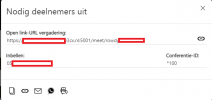
So, I then dial 700 and enter *100# to join this particular conference.
That doesn't work, I just get the on-hold music indefinately.
When I create a 'real' video meeting, I get different conference-ID's of 6 digits.
But the system does show me the dial-in number, so it seems it would be possible?
Am I missing something, or is this a bug (eg. the conference-ID should not be shown for quick meetings)?
Thanks!
In version 16 it was not possible to dial-in to a quick video meeting.
In version 18, it seems possible but I cannot get it to work.
Steps:
1. In de new Windows Desktop client, click the 'meet' tab
2. By default, a new ad hoc video meeting is started and it shows this screen:
So, I then dial 700 and enter *100# to join this particular conference.
That doesn't work, I just get the on-hold music indefinately.
When I create a 'real' video meeting, I get different conference-ID's of 6 digits.
But the system does show me the dial-in number, so it seems it would be possible?
Am I missing something, or is this a bug (eg. the conference-ID should not be shown for quick meetings)?
Thanks!


