Solved Random Caller Silence

Status
Not open for further replies.

siscom

Customer
Basic Certified
Joined
Jul 14, 2009
Messages
237
Reaction score
37
Good Afternoon Colleagues
I hope you are doing good and safe . One of my customers has the below 3CX system:
  • 3CX License: Pro 16 concurrent calls
  • 3CX Version: 16.0.9
  • Operating System: Windows 10
  • Workstation Specs : Core i7 , 8 GB RAM

Sometimes when a call received at the call centre , The below issue happenws (I summarized the below based on the recording in addition to the reporting from agent and the caller):
  • Call received at the required queue.
  • Call forwarded to the next available agent.
  • The agent pickup the call and start talking to caller.
  • The caller can not hear the agent at all.
  • In the recording , The voice of agent is very clear and i can hear him but no voice from caller.
  • When we call the caller number from a private mobile phone , He reported that he can not hear the agent.

Do you have any idea the root cause and the solution for this issue which is not regularly happened?

Best Regards
 
First , make sure that all of the required audio ports are open, run the 3CX Firewall Checker.

Also, check the 3CX Activity Log, after of the problem calls, to be certain that it isn't a Codec incompatibility issue, or shows another error message.
 
@siscom

Could you also provide the following information:

• What SIP Provider are you using?

• "When we call the caller number from a private mobile phone , He reported that he can not hear the agent." What do you mean by this exactly? Are you referring to a GSM mobile number completely unrelated to 3CX?

• What 3CX endpoints are you using? 3CX Webclient, 3CX Windows App, 3CX Mobile Apps, IP Phones? If IP Phones, how are they provisioned(SBC, STUN or Local)?

• Is the 3CX PBX on-prem or is it Hosted in the cloud?

• Is this issue affecting every single call?

• Does it happen for both external(extension to external number and vice-versa) and internal calls(extension to extension)?
 
First , make sure that all of the required audio ports are open, run the 3CX Firewall Checker.

Also, check the 3CX Activity Log, after of the problem calls, to be certain that it isn't a Codec incompatibility issue, or shows another error message.
Good Morning Leejor
Let me share with you that calls directed from 3CX==>E1 VOIP gateway==>PSTN provider.

We are not connected to SIP provider.

Based on the above , Should i still need to check audio ports opened or Codec incompatibility issue ?

Best Regards
 
@siscom

Could you also provide the following information:

• What SIP Provider are you using?

• "When we call the caller number from a private mobile phone , He reported that he can not hear the agent." What do you mean by this exactly? Are you referring to a GSM mobile number completely unrelated to 3CX?

• What 3CX endpoints are you using? 3CX Webclient, 3CX Windows App, 3CX Mobile Apps, IP Phones? If IP Phones, how are they provisioned(SBC, STUN or Local)?

• Is the 3CX PBX on-prem or is it Hosted in the cloud?

• Is this issue affecting every single call?

• Does it happen for both external(extension to external number and vice-versa) and internal calls(extension to extension)?
Good Morning Chris
Kindly find my below replay:
  • The calls directed from 3CX==>E1 VOIP gateway==>PSTN provider. We are not connected to SIP provider.
  • Yes . What i mean by private mobile number is a GSM mobile number completely unrelated to 3CX.
  • 3CX endpoints used are 3CX Windows App.
  • 3CX PBX is on-prem.
  • This issue randomly happened.
  • This is call centre so we don't have internal calls . It is only external calls.

Best Regards
 
The calls directed from 3CX==>E1 VOIP gateway==>PSTN provider.
If the Gateway is local to the 3CX PBX and therefore traffic from it to 3CX is not going through a firewall, then port configuration should not be required no. Is the Gateway local to 3CX?

Should i still need to check audio ports opened or Codec incompatibility issue ?
You would still need to check codec compatibility between the Gateway and 3CX, though, since the call gets established, there is a good chance they are successfully negotiating on which codec to be used.

What Gateway are you using? Is it a 3CX Supported Gateway?

Yes . What i mean by private mobile number is a GSM mobile number completely unrelated to 3CX.
This actually suggests that the issue might be with the caller. Are you facing these issues only with this specific caller?
 
Hello Chris
Kindly find my below notes:
  • The gateway and 3CX workstation connected to the same switch . No firewall between them.
  • The gateway is Dinstar which is not supported gateway by 3CX.
  • This issue happens randomly with random callers at random time.

Best Regards
 
Since it's not a 3CX supported gateway, we can't really guarantee normal operation or that it would work at all for that matter. However, the fact that it works most of the time may mean that you might be able to do something about it.

What I would recommend first is trying to narrow down the cause of the issue as much as possible. You could for instance have a packet capture running on the 3CX PBX and on the Gateway(maybe via port mirroring), and then wait for the issue to occur. Once it does, you could analyze the packet captures and determine if audio is being sent /received by the Gateway and the 3CX PBX. This will help you understand if the up to which point audio is being sent and therefore know where to dig deeper. If for instance there is no audio coming from the Gateway to 3CX, it may mean it is something to do with the Gateway itself or the PSTN Line.

You might want to check our training material which explains how to take a capture on 3CX and analyze it here slide (9 - 11): https://www.3cx.com/3cxacademy/videos/advanced/basic-troubleshooting/


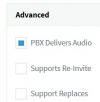
Edit: Before investigating this further, what you could try as a quick test is editing the Gateway under the 3CX SIP Trunk section and making sure that "PBX Delivers Audio" is Enabled and that both "Supports Re-invite" and "Support Replaces" are disabled:
1625491401220.png
 
Good Morning Chris
Thx for your feedback . I confirmed that "PBX Delivers Audio" is Enabled and that both "Supports Re-invite" and "Support Replaces" are disabled:

I really don't have a switch that support port mirror to be able to perform further investigation.

Based on this discussion with you and Leejor , I think the problem - most probably- at caller side (GSM network). The reason of my suggestion that a GSM number call the call centre and the issue happened where the agent voice is clear while the caller can't hear the agent voice . What happened next that the caller close the call and immediately call the call centre again and both caller and agent can hear each other very clear.

@leejor & @Chris A Kindly let me know if my suggestion is true or not based on your experience.


Best Regards
 
To be completely honest, you can't be 100% certain. Even if you could run a packet capture on both the Gateway and the 3CX PBX and you had confirmed that audio was leaving the 3CX PBX and reaching the Gateway you would still not be sure if the gateway is sending it to the provider or not. You would however eliminate the possibility of the 3CX PBX being related to the issue and you could then maybe also involve the provider to help with the investigation.

However, what does suggest it may be a provider issue, is the test you made with the GSM call which was unrelated to 3CX, but still got the same issue.
 
Hi Chris
Thx for your feedback . My VOIP gateway has packet capture feature so let me try to use it and hopefully it can give me visibility for what is happening.

I will let you know.

Best Regards
 
  • Like
Reactions: ChrisC_3CX
Great! Hopefully it helps to at least narrow it down!
 
Hi Chris
Attached is pcap capture file from the VOIP gateway for 2 calls . At the time of this capture you should hear 3CX system prompt message which always played when there is no agent available . Kindly find the below notes:
  • The first call has the issue i mentioned where the caller can not hear anything. When open wireshark to hear call from wireshark , I noticed that there is a noise in direction from VOIP gateway to 3CX.
  • The second call is perfect where the caller can hear 3CX system prompt message.
  • The IP Address of 3CX is 192.168.1.250 while the ip address of gateway is 192.168.1.251.
  • I can hear the calls by open wireshark==> Telephony ==> VOIP Call.
Appreciate you check and let me know your feedback.

Best Regards
 
Do note that I have removed the packet capture from your post due to it possibly containing sensitive information.

I have given it a look and can see exactly what you describe. In the first call, the Gateway does send audio to 3CX though it is noise. In the second call there is no noisy audio from the Gateway to 3CX which as you said, is the call that had no issues.

The fact that the Gateway does send audio to 3CX, regardless if it's noise or not, suggests that the issue may indeed be with the provider. Though this is most likely the case, you still cannot completely eliminate the possibility of this issue being related to the gateway as it is the one doing the conversion from SIP to analogue signals and vice-versa. If this is an issue you can reproduce frequently enough and provided the following is possible without disrupting normal operations, it might be worth just connecting an analogue phone directly to the PSTN line to check if it still occurs. If it does, this would further confirm it is an issue with the provider.
 
Thx Chris for your great support . I can't connect analog phone as you suggest because it will interrupt the call centre operation but as a test , I will try to temporary replace this gateway with Patton E1 4960 gateway.

From your point of view , If the problem occurs while Patton gateway in use , Does this mean that the problem at provider side 100% ?

Best Regards
 
From your point of view , If the problem occurs while Patton gateway in use , Does this mean that the problem at provider side 100% ?
To be completely honest, I do tend to need well grounded evidence that leaves no room for doubt to be able to say I am 100% sure about something ;), but, if you do test a second gateway and get the same issue it would be highly unlikely that both gateways are at fault. At that point, though I would then recommend checking with the provider, do bear in mind that the media over which you are provided with the service (PSTN Line) is part of the equation too. That said, don't be surprised if this ends up being a problem with the on-premises wiring.
 
Make sense . Thx for your feedback & your support in this case .

Please fell free to close the case.
 
  • Like
Reactions: ChrisC_3CX
You're very welcome!

Please feel free to start a new thread should you require additional assistance or information!
 
Status
Not open for further replies.

Forum statistics

Threads
111,974
Messages
590,081
Members
164,899
Latest member
mazet