• We do not provide troubleshooting help for unsupported phones. Please try with a supported phone.
  • V20 Update 10 Alpha Learn more

Solved Raspberry PI4 SBC still supported?

Status
Not open for further replies.

baylor.cody

Silver Partner
Basic Certified
Joined
Aug 4, 2021
Messages
7
Reaction score
0
I have a V20 system and am trying to install an SBC on a raspberry pi4. In the past I have had no issues but on the 3cx site all the write ups are for the raspberry pi5. Anyone else had luck recently?
 
Hi Cody,

You can use it if you have it. Just make sure to use the latest images and instructions from the guide.
 
  • Like
Reactions: Evolute IT
You are right. Just needed to update firmware on the rasp pi
 
Hey Guys, we're seeing a similar issues. We have fully updated our Pi4 with the latest firmware and any attempt to install or upgrade an SBC using the latest 3CX ISO referenced in the link below.

https://www.3cx.com/blog/releases/raspberry-pi5-sbc/

To be clear, the Pi4 is fully up to date on firmware and we have used the most up to date bookworm. Storage has been flushed.

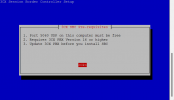
We are unable to select OK to proceed with the installation. Has anybody any ideas on where to go from here please?

3cx sbc error.png
 
Press the tab key and then the enter key.
 
Hey Guys, we're seeing a similar issues. We have fully updated our Pi4 with the latest firmware and any attempt to install or upgrade an SBC using the latest 3CX ISO referenced in the link below.

https://www.3cx.com/blog/releases/raspberry-pi5-sbc/

To be clear, the Pi4 is fully up to date on firmware and we have used the most up to date bookworm. Storage has been flushed.

We are unable to select OK to proceed with the installation. Has anybody any ideas on where to go from here please?

Hi Colin,

"OK" is already selected red, you are simply supposed to press ENTER. It's on the next page on the agreement screen that you need TAB to highlight "Accept".

If you click the Pi article linked in the blog post it gives a specific command that you need to paste to install the SBC application:
Bash:
sudo bash -c "$(wget -qO- http://downloads-global.3cx.com/downloads/sbc/3cxsbc.zip)"

If you used the old command, you will be stuck and the wizard will not proceed.
 
Hi Colin,

"OK" is already selected red, you are simply supposed to press ENTER. It's on the next page on the agreement screen that you need TAB to highlight "Accept".

If you click the Pi article linked in the blog post it gives a specific command that you need to paste to install the SBC application:
Bash:
sudo bash -c "$(wget -qO- http://downloads-global.3cx.com/downloads/sbc/3cxsbc.zip)"

If you used the old command, you will be stuck and the wizard will not proceed.
Thanks John, that's worked perfectly. I think it must have been an oversight by a busy engineer!
 
  • Like
Reactions: JohnS_3CX
Status
Not open for further replies.

Members Online Now

No members online now.

Forum statistics

Threads
111,831
Messages
589,277
Members
164,660
Latest member
RJenkinsROCK