Solved Re deploy 3cx using PBX Express

Status
Not open for further replies.

yedmusic1

Free User
Joined
Jan 1, 2020
Messages
10
Reaction score
1
Since 3cx lately only let's you use the PBX EXPRESS in the email where you get a new license key what would be the best way to reinstall 3cx
 
Since 3cx lately only let's you use the PBX EXPRESS in the email where you get a new license key what would be the best way to reinstall 3cx
Meaning to reinstall 3cx from a backup using the PBX EXPRESS ??
 
@yedmusic1 this option is available to restore a backup up to 500MB when you select the option to host with 3cx.
If you select Self Hosted option, then you will have to install the PBX and then restore your backup on top of the PBX from an FTP, SFTP or Google Bucket. This will bring your configuration in to your Self Hosted PBX.
Option to restore the backup during installation on Self Hosted does not exist.
 
This is why the option no longer exist :

1610009903658.png
 
  • Like
Reactions: NikosT_3CX
So how would it work let's say I have a lightsail instance and I wanna move it to Google or let's I by mistake deleted the instance and I wanna reinstall it how can I take the pbx express again and install it or what would be the best way of reinstalling it?
Thanks in advance

As of now it looks like the only way to reinstall a instance is to get a new license key on a different email and take the PBX express and then restore from backup ?

I will try to explain my initial question even if I wanna do it the ways you guys told me there is no way to take the PBX express you can only use it one time when you first install the instance

Let's say right now I wanna take the PBX express where do I go or what would be the cmds to install 3CX via debian

Sorry for the so many replies
 
@yedmusic1 let clear things up :)
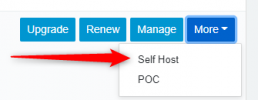
From the portal you can only use once the key to host with 3cx.
With Self Host you can use it as many times as you want to deploy your key to different Hosting Providers like AWS, Lightsail, Google, Azure or Openstack API Hosting Providers.
1610026760054.png

Of course it is highly recommended to keep your backups of your PBXs to another location and not on the same machine where your PBX is installed on. You can choose FTP, SFTP or Google Bucket for PBXs in the Cloud.
With this way even if you delete the Instance or for some reason machine crashes, you are safe 100% and you have Backups.
So when you setup your new PBX then you pull the backup and you restore it on top of the new PBX.
 
Now we're talking.

Thanks a million
 
  • Like
Reactions: NikosT_3CX
Status
Not open for further replies.

Forum statistics

Threads
111,974
Messages
590,081
Members
164,899
Latest member
mazet