Record IVR Digital Receptionist Message using PC?

Avram Grossman

Customer
Joined
Jan 5, 2019
Messages
40
Reaction score
2
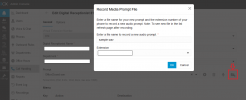
Many posted about this for V20. Most threads are closed, but I do have to say this is a crazy "feature."
My client's PC/server is in a tight space, noisy closet that is hard to access.
It is NOT possible to go into the computer room to record a message! Especially if it needs to be done by someone other than me.
I don't want to hear my voice on all my client's phone system!
PLEASE BRING BACK Recording from an IP Phone.
 
1742074077406.png
 
You may want to consider not using a human voice at all. OpenAI's Text-to-speech has gotten so amazingly good that I personally cannot tell the difference between a human speaking vs AI. Perhaps the best choice is to eliminate the human recorded voice from the process entirely.

The forum software would not allow me to upload a sample .wav file, so I had to zip the example audio file. This audio was generated from an excerpt I pulled directly from our website unedited and with no further instructions about inflection, pacing, etc. This example is 100% out-of-the-box OpenAI.
 

Attachments

  • Like
Reactions: fxbastler
You may want to consider not using a human voice at all. OpenAI's Text-to-speech has gotten so amazingly good that I personally cannot tell the difference between a human speaking vs AI. Perhaps the best choice is to eliminate the human recorded voice from the process entirely.
full ack, nice example

We prefer a woman's voice for AI TTS, it is better understandable.
 
That is only one example of many voices available in multiple languages. I agree, however, that there are times where a female voice is preferred, and others (like collections activities) where perhaps a male voice is better.
 
Hi Avram, just a footnote comment in case this could be helpful.

My boilerplate way to deal with this

- either ask client to record the IVR/audio on their smartphone using bult-in voice recorder memo app (IOS or Android each have such built in, so most people have this available to them easily / and most are happy-comfortable to use the thing without drama)
-- OR we use online "Natura voice reader" to convert text scripts into audio file (ie, I do this sitting on my laptop/web browser, in a comfortable place, not in a small noisy server room ideally!)
-- then I use the 3cx audio converter tool > https://www.3cx.com/docs/converting-wav-file/ > to get (whatever format the client emails to me from their smartphone (m4a or mp3 or overly-dense-WAV-file-or-whatever), or I have generated on my laptop via browser)
-- once I have a good format WAV file I use the web-admin for 3cx to simply upload-the-wav file to 3cx
-- and then the audio file is available to link direct to IVR/etc. with ease

and this generally works very smoothly

Not 100% sure this could be helpful but just in case.

Tim

(* this can be helpful for getting a new 'music on hold' tune uploaded, in case you want to not use the system default jazzy-jazz song)
 
  • Like
Reactions: jed
It is so inexpensive to perform text-to-speech using OpenAI (pennies), that I have decided to make our internal tool publicly accessible on our website for free. We will let you type in your prompt text, select the voice and language, and download the 3CX compatible wav file all for free.

I already have the tool, so give me a couple of days to get this in place. I have to select an obvious location to put it on our website. I'm doing this because I loathe recording IVR, queue, and voicemail prompts. It's one of those tasks that I avoid as long as I can. Let's eliminate the unpleasant task for everyone. I will update this post when it is ready. You are going to love it.
 
  • Love
Reactions: fxbastler
It is so inexpensive to perform text-to-speech using OpenAI (pennies), that I have decided to make our internal tool publicly accessible on our website for free. We will let you type in your prompt text, select the voice and language, and download the 3CX compatible wav file all for free.

I already have the tool, so give me a couple of days to get this in place. I have to select an obvious location to put it on our website. I'm doing this because I loathe recording IVR, queue, and voicemail prompts. It's one of those tasks that I avoid as long as I can. Let's eliminate the unpleasant task for everyone. I will update this post when it is ready. You are going to love it.
This sounds great! Thank you... I totally agree, it is quite nice-good-insane how the text-to-speech tools have evolved in the last ~few years. I can still remember the 'good old days' when this was new crazy exciting tech. (For a lark - google > youtube -> takes me to this rather silly walk down memory lane >
)

anyhoo. This is amazing if you can put this OpenAI driven tool in place to make this simpler-and-lovely for all 3cx users/admins. Thanks again!

-Tim
 
It is so inexpensive to perform text-to-speech using OpenAI (pennies), that I have decided to make our internal tool publicly accessible on our website for free. We will let you type in your prompt text, select the voice and language, and download the 3CX compatible wav file all for free.

I already have the tool, so give me a couple of days to get this in place. I have to select an obvious location to put it on our website. I'm doing this because I loathe recording IVR, queue, and voicemail prompts. It's one of those tasks that I avoid as long as I can. Let's eliminate the unpleasant task for everyone. I will update this post when it is ready. You are going to love it.
Did you ever release this?
 
  • Like
Reactions: Evolute IT
Yikes, I forgot all about this. Nothing has changed... it is still pennies. Dang it, Ill try to get this done in the next couple of days. I will provide a language choice, a voice selection (based on the selected language), a text box for the text-to-speech, and a download link.
 

Forum statistics

Threads
111,952
Messages
589,903
Members
164,845
Latest member
tdzski5