Solved Recording Access

Status
Not open for further replies.

Dinz DX

Forum User
Joined
Sep 19, 2019
Messages
10
Reaction score
0
Hi
We have one group in 3CX I want to give permission for that team leader can able to see All the recordings in
the group but won't give full access, kindly tell me solution for this??
 
Hi,

You want them to only see the group recordings, but not the whole system recordings of the rest of the groups?
 
Hi,

You want them to only see the group recordings, but not the whole system recordings of the rest of the groups?


ya exactly??? Kindly tell me the solution if u knw means.
 
12665
 
Ya I'll gave this option, but in that person login he can able to see his own recordings only not getting group members recording.
 
Last edited:
Actually, I've just turned on that feature I pointed out and i can see all the recordings of groups im in.

Are you setting the permissions correctly for the EXT?

Are you using a Pro or Ent license?

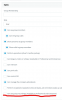
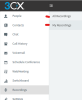
You get a 2nd option like this and your groups will be in all recordings:

12669
 
  • Like
Reactions: JohnS_3CX

So under your Group > Group Rights under Manager Rights enable the "can see group recordings".

Go to the EXT of your group manager > Rights > under the group membership ensure his role is Manager.

Can he now see the recordings?

Another thing that comes to mind - Have you turned on call recording for those other EXT in the group.
 
Another thing that comes to mind - Have you turned on call recording for those other EXT in the group.
Now it's working, thanq for ur support.
 
Status
Not open for further replies.

Forum statistics

Threads
111,934
Messages
589,818
Members
164,811
Latest member
aurorasigntrtechitnet