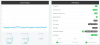
Recording disk used space is displaying '-'/294.0GB can't check disk used space at recording

Status
Not open for further replies.

NH Sekuritas

Customer
Joined
Mar 9, 2020
Messages
2
Reaction score
0
I'm facing on can't check disk used space.

We just migrated from old server to new server but the recording disk used space is displaying '-'/294.0GB. (294GB is maximum of the recording disk)

What is different old server and new server.
- I attached new disk for recording on new server.
1583733602157.png

Dashboard
1583733627989.png
 
What is the path for your recordings ? You will find the settings under Recordings - Location

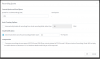
Also have you limited the space recording can take - Recordings - Quota
 
What is the path for your recordings ? You will find the settings under Recordings - Location

Also have you limited the space recording can take - Recordings - Quota
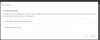
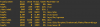
The recording disk mounted to '/var/lib/3cxpbx/Instance1/Data/Recordings'

The recording location is already set up same as the recording disk
1583752092638.png

Quote (The limit is correct if I put 295 GB I got error message as the maximum is 294GB)
1583752149691.png
 
Status
Not open for further replies.

Latest Posts

Forum statistics

Threads
111,939
Messages
589,843
Members
164,824
Latest member
Xeniosg