Recording doesn't start again after stopping

Status
Not open for further replies.

Sommer

Customer
Intermediate Cert.
Joined
Oct 20, 2017
Messages
35
Reaction score
5
Hello.

A customer likes to record a lot of his calls but also likes to stop the recording and then start it again. He uses the Windows-Softclient for that.
Unfortunately the recording doesn't start again after it is stopped the first time in the call.

Is this the desired behaviour of 3CX? Any way to change that instead of updating to V16?

Its a V15.5.6 on Debian.


Thank you and best regards,
Sommer
 
Hi @Sommer,

Firstly, may I suggest updating to the latest version of 3CX? 15.5 is no longer supported and this may lead to issues going forward.

Is the client using an Enterprise edition of 3CX?

Is the client able to start the recording again and it doesn't save, or is he simply not able to click the record button to restart the recordings after stopping them?
 
Hello VasilisV,

the client is using 3CX Professional Edition.
The client is able to click the record button, but after the call there will only be one recording to the point where he stopped recording the first time. So there is no second recording saved.

We postponed the update to V16 since in the Windows-client for V16 the function to listen to recordings via IP-Phone are gone, which is the primary way for the customer to listen to his recordings.


Thanks for the quick answer.

Best regards,
Sommer
 
Hi @Sommer,

v15.5 is unsupported and development has been ceased on this version.

May I again suggest upgrading to v16. Yes this will require an enterprise license, but it will create a single call recording file, which I've just tested and it works as intended. Note that in the Call Recording section in the Extension >> Options section, the option 'Allow users to start and stop recording (By pressing rec on off button in the clients / IP Phone) (Available in Enterprise only)' should be checked.

Also these recordings can be listened to from the Windows-Client by clicking Settings (two cogs) >> Recordings. Ensure that the extension has the rights to view group recordings.
 
Hello VasilisV,

so as far as I'm understanding this, is that the customer needs the enterprise-version to stop/start a recording several times?

It's not about the recording-list in the softclient - this is still available. It's about the function to let the recording playback on the phone. This function disappeard with V16.
 
Yes you will need an enterprise license to receive the recordings as one file.

The extension can listen to the recordings on the IP Phone by choosing Extensions >> <Your Extension> >> Phone Provisioning >> 3CX App >> Show Call Recordings (check this box), then from the Web Client select your phone to receive calls on and play the recording.

1617009787086.png
You'll now receive the recording on the phone.
 
Hello @VasilisV_3CX

The customer agreed to buy the enterprise license.
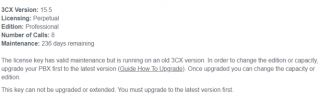
But I've now been told, that to upgrade the LICENSE to enterpise we need to update the 3CX to V16 which is at least an additional hour of work which the customer needs to pay, since we need to drive onsite and install the correct debian-version for V16.

Is there another way to update ONLY THE LICENSE from professional to enterprise? Maybe uninstall the 3CX, upgrade the key and install v15 again?
1617022168322.png

Best regards,
Sommer
 
Hi @Sommer,

No, you'd need to install the v16 version following the guide. The function whereby the recording merges into one file is a v16 function so there is no way to upgrade the license key, then install v15.5 and have it work as intended.
 
Status
Not open for further replies.

Forum statistics

Threads
112,349
Messages
592,026
Members
165,512
Latest member
gmacinit