Solved Recordings not archiving to FTP

Status
Not open for further replies.

Rej

Bronze Partner
Basic Certified
Joined
Jan 15, 2024
Messages
31
Reaction score
14
Hi,

All of our self-hosted 3CX customers are configured to archive and back up to an external FTP server. Each client has their own username. All of them, except one, are working fine. All customers are running Version 20.0 Update 8 (Build 1109 Release).

Out of the blue (since January), this particular customer’s 3CX instance stopped sending call recordings to the FTP server. I manually created a backup including all local recordings, and it was successfully sent to the FTP server.

I also tried renaming the recordings storage folder. The system created the new folder on the FTP server, but it still refuses to send the recordings.

I performed a test on our own instance by setting the archive delay to 60 days and waiting until the recordings reached 4 GB. When I clicked the Archive button, it worked without any issues.

Please note that all FTP users have the exact same configuration. I even created a brand new FTP user for this client, but the issue persisted.

Has anyone experienced this issue before?
 
Is there any specific error in the Event log?
 
Last edited:
Is there any specific error in the Event log?
Nothing at all. I just tried again and there is no error or anything in the event log.
I did a test login using the same user and password with FileZilla, and I was able to upload files to the FTP server and its folders without any issues.
In 3CX, as soon as I click the Move to Archive button, the spinning icon appears, then the 3.93 GB text flashes, and the Archive Now button returns to its original state.
 
Hi Raj, what I can recommend is to turn on logging on the FT side and try to archive some recordings from the recordings section. If this fails, check the FTP logs to reveal what happened and why this is occurring for you.
 
Hi Raj, what I can recommend is to turn on logging on the FT side and try to archive some recordings from the recordings section. If this fails, check the FTP logs to reveal what happened and why this is occurring for you.
Hi ! After reviewing the log, at each attempt to click the Archive Now button, there's a connection made but no transfer
Code:
2026-02-19T02:25:42.230022+00:00 MYFTPSERVERADRESS sftpgo[3847664] [info]: {"level":"info","time":"2026-02-19T02:25:42.229","sender":"FTP","connection_id":"FTP_0_1689","message":"User \"3CX FTP USER NAME\" logged in with \"password\" from ip \"IPV6 OF 3CX INSTANCE\", TLS enabled? false"}
When I created a back up, it does connect the same way but the transfer is made.
Code:
2026-02-19T02:25:18.831917+00:00 FTPSERVERADDRESS sftpgo[3847664] [info]: {"level":"info","time":"2026-02-19T02:25:18.831","sender":"Upload","local_addr":"[3CX INSTANCE IPV6:2]:21","remote_addr":"[3CX INSTANCE IPV6:4001]:57118","elapsed_ms":290687,"size_bytes":3385025968,"username":"3CX FTP USERNAME","file_path":"PATHTOMYFOLDER/backups/feb18.zip","connection_id":"FTP_0_1686","protocol":"FTP","ftp_mode":"passive"}

The FTP server provider confirmed that there is nothing on their side that could cause a block. All of my sub-accounts are set up with unlimited transfers and no restrictions on file size or anything else. Additionally, all of the other 3CX instances that use the same server with the same parameters are able to transfer recordings without any issues.

The only difference is that all of my other 3CX instances are hosted on Azure, while this problematic one is hosted on DigitalOcean. Aside from that, all other parameters and settings are identical.
 
Since you have already reviewed the FTP server and no errors were identified, we would suggest opening a Support Ticket so we can review the current configuration along with the system logs to better understand the issue.

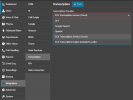
That said, please log in as System Owner and navigate to Admin > Integrations > Transcription. Could you please confirm whether the transcription service is enabled? If so, please set it to OFF and save the changes:

1771527641034.png


Once this is done, please attempt to archive the recordings again and let us know whether the issue persists.
 
Since you have already reviewed the FTP server and no errors were identified, we would suggest opening a Support Ticket so we can review the current configuration along with the system logs to better understand the issue.

That said, please log in as System Owner and navigate to Admin > Integrations > Transcription. Could you please confirm whether the transcription service is enabled? If so, please set it to OFF and save the changes:

View attachment 51075


Once this is done, please attempt to archive the recordings again and let us know whether the issue persists.
ISSUE RESOLVED. We never enabled that transcription setting but for an unknown reason it was on 3CX Transcription Service. After turning it OFF and clicking on ARCHIVE NOW, everything was working properly.

Thanks
 
Since you have already reviewed the FTP server and no errors were identified, we would suggest opening a Support Ticket so we can review the current configuration along with the system logs to better understand the issue.

That said, please log in as System Owner and navigate to Admin > Integrations > Transcription. Could you please confirm whether the transcription service is enabled? If so, please set it to OFF and save the changes:

View attachment 51075


Once this is done, please attempt to archive the recordings again and let us know whether the issue persists.
Thank you! Was scratching my head for ages on this one!
 
Status
Not open for further replies.

Forum statistics

Threads
111,974
Messages
590,080
Members
164,899
Latest member
mazet