- Joined
- Sep 3, 2021
- Messages
- 6
- Reaction score
- 0
Hi All,
I'm trying to setup a configuration where all outbound calls (no matter which number the dial) from extensions in a group are redirected to a ring group.
But added to this, time conditions are needed. So that after midnight a message is played with an IVR.
To get this working I created a generic sip trunk (to be used as a loopback), registerar on 127.0.0.1, with the main trunk number set to 1111.
I have setup the time conditions here and setup the routing to a ring group.
I also created an outbound rule applied to the specific group, to send calls to the loopback sip trunk.
With this configuration, any number the end users calls will be redirected to the loopback trunk, and send to 1111 which in turn redirects it to the desired ring group (ext 800)
The problem I'm having is that the phones in the ring group see incomming calls as comming from 1111, not the original caller.
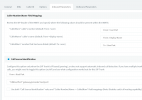
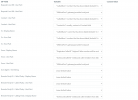
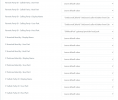
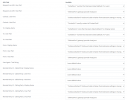
I tried changing the parameters in the caller number/name field mapping on the inbound parameters on the sip trunk, but with no luck.
Does anybody know what the correct settings would be to get the original caller id to be shown?
I'm trying to setup a configuration where all outbound calls (no matter which number the dial) from extensions in a group are redirected to a ring group.
But added to this, time conditions are needed. So that after midnight a message is played with an IVR.
To get this working I created a generic sip trunk (to be used as a loopback), registerar on 127.0.0.1, with the main trunk number set to 1111.
I have setup the time conditions here and setup the routing to a ring group.
I also created an outbound rule applied to the specific group, to send calls to the loopback sip trunk.
With this configuration, any number the end users calls will be redirected to the loopback trunk, and send to 1111 which in turn redirects it to the desired ring group (ext 800)
The problem I'm having is that the phones in the ring group see incomming calls as comming from 1111, not the original caller.
I tried changing the parameters in the caller number/name field mapping on the inbound parameters on the sip trunk, but with no luck.
Does anybody know what the correct settings would be to get the original caller id to be shown?