Reformat callerid rule not saving

hpd3

Customer
Joined
Feb 17, 2025
Messages
12
Reaction score
2
I have entered an option to reformat the callerid to simply remove the + sign from the number so that phones can call back a number from the history screen ( they fail since it has the + in front of the number), however, when I enter the string changes, I hit to save to apply, but it is not saving the changes. Here is the screenshot of what I am adding, but system will not keep the changes. Also, I do not have the option checked to switch callerid to e164 conversion on the options screen. Any idea? Or maybe this should be done as an outbound rule and not sure if I need the e164 remove same country option setting
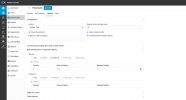
3cx reformat callerid to remove + from number.jpg
in e164 processing
 
Last edited:
Hello hpd3,

Can you please confirm the 3CX software version that you are using here.

Paulo
 
Hello,

When I did try this on my own system, i was able to add the line and press the SAVE button.
Re-open the trunk, where the line +(.*) was gone (not saved).

Just in case, that i personally did something wrong, tested again, but now it works fine ??
Working on Version 20.0 Update 6 (Build 724 Release) selfhosted.

Did you encounter the same problem, or almost the same, or just differend?

Paulo
 
Hello,

When I did try this on my own system, i was able to add the line and press the SAVE button.
Re-open the trunk, where the line +(.*) was gone (not saved).

Just in case, that i personally did something wrong, tested again, but now it works fine ??
Working on Version 20.0 Update 6 (Build 724 Release) selfhosted.

Did you encounter the same problem, or almost the same, or just differend?

Paulo
Yes, that is the same issue. I make the changes, then press the save button, changes show on the screen. If i leave and reopen the screen, changes are gone and not save. have tried multiple times.
 
anyone have other ideas how I can simply remove the + sign from coming through on the callerid number to the phone
 
Hi,

Outbound rule would work.

@hpd3 , @paulodagraca what Trunk providers did you test? I have tried it with an IP and a Credentials based and it seemed to save fine, would like to get as much info to see if this can be replicated.

@paulodagraca I understand for you it worked on the second attempt?
 
Hello,

First of all, I do not think the problem is the 3CX server, as the function works fine.

Yes, I have 'seen' this problem once, but again it works fine.
As per my personal point of view the problem would be or could be the browser and the web cache.

So anyone that does run into this, please clear cache or change browser (Edge<->Chrome).
@hpd3 please let us know, how you are getting on?

Paulo
 
Last edited:
  • Like
Reactions: KyriacosS_3CX
Hello,

First of all, I do not think the problem is the 3CX server, as the function works fine.

Yes, I have 'seen' this problem once, but again it works fine.
As per my personal point of view the problem would be or could be the browser and the web cache.

So anyone that does run into this, please clear cache or change browser (Edge<->Chrome).
@hpd3 please let us know, how you are getting on?

Paulo
Hello. To clarify where you said you have seen this but it works fine, are you saying that the rule is applying correctly even though it does not show it on the screen? I will do more testing with them today as I am offsite. I did try a different browser and result is same, it does not save correctly. I am using a Flowroute trunk....this system has been up for several years
 
Can you enable Debug logging, try to make the change and see if anything relevant is written to the log?
 
Hello,

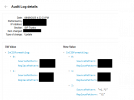
looking back at the log, it seems it did work the first time for me @4:22

1757509865321.png

1757509701862.png

So, for me it was the browser (i think), this does not mean it has to be the same with what you have now but could be??

Paulo
 
Hello,

looking back at the log, it seems it did work the first time for me @4:22

View attachment 49318

View attachment 49317

So, for me it was the browser (i think), this does not mean it has to be the same with what you have now but could be??

Paulo
Thank you for continuing to provide information. I do not seem to get the same details in my audit logs. I went in the dashboard and turned on verbose logging, but dont get this level of detail. am I missing something or looking in wrong place?
 
Hello,

please check the Audit Log, from the Admin Dashboard:

1757511848683.png

Paulo
 
Hello,

please check the Audit Log, from the Admin Dashboard:

View attachment 49320

Paulo
I have looked there, it is enabled, I have verbose logging on, but there is nothing in the audit log that has to do with my sip trunk or any changes trying to get applied.
 
@hpd3 ,

It seems the save does not work as nothing is there in the Log.
Not sure how to help you with this, as it should always work.

Again i am not sure, but you could try following options:
Create a new trunk and try this in the new trunk (does not have to be a working trunk).
or
Backup and restore the 3CX, and reboot system afterwards, then try again.

Paulo
 
Last edited:
@hpd3 ,

It seems the save does not work as nothing is there in the Log.
Not sure how to help you with this, as it should always work.

Again i am not sure, but you could try following options:
Create a new trunk and try this in the new trunk (does not have to be a working trunk).
or
Backup and restore the 3CX, and reboot system afterwards, then try again.

Paulo
Ok....do you know of any other way to program to drop/ignore the + when they try to redial from the history screen without making this change??? some other outbound rule ?
 
outbound rule match prefix + , strip one digit would do it.
 
  • Like
Reactions: YiannisH_3CX
Is that the only thing not saving in the trunk? If you try to add a fake DID does it save it? When you press the Save button does the UI take you back to the Voice & Chat menu?
Perhaps there is another error in the trunk that prevents you from making any changes.
 
  • Like
Reactions: paulodagraca

Latest Posts

Members Online Now

Forum statistics

Threads
111,831
Messages
589,276
Members
164,660
Latest member
RJenkinsROCK