Solved Registed unsupported phones on SBC

Status
Not open for further replies.

davide.bonavita

Premier Customer
Joined
Apr 17, 2020
Messages
136
Reaction score
29
Hello,
we've just received a nice SBC from Pimoroni in order to use a coupe of unsupported SIP phones we have laying on premise. The SBC is connected to the 3CX server on cloud and everything looks fine, except that I can't see the SIP port open on the SBC:


Bash:
pi@3cx-sbc:/etc $ netstat  -a | grep 5060
pi@3cx-sbc:/etc $

Any hint?
 
To check whether the SBC is listening on port 5060 try

netstat -pano | grep 5060
 
The SBC uses the 3CX Tunnel to connect to 3CX(the PBX listens on port 5090) and listens on port 5060 locally. That said, do note that we can't guarantee that the unsupported phones will work without problems with the SBC so we would of course recommend using supported ones for a more trouble free experience.
 
  • Like
Reactions: MidiTélécom
To check whether the SBC is listening on port 5060 try

netstat -pano | grep 5060

dud.. my bad, shame on me.
Still it doesn't seem to authenticate on SBC (404 user not found), but maybe I'm missing something. I'm using the extension number as username and this password:

Code:
tail /var/log/3cxsbc/3cxsbc.log

SIP/2.0 404 User unknown.
Via: SIP/2.0/UDP 10.100.0.127:5060;rport=5060;branch=z9hG4bK1357447738
To: "103"<sip:[email protected]:5060>;tag=1f123d5a
From: "103"<sip:[email protected]:5060>;tag=1152775549
Call-ID: 1075138322
CSeq: 2 REGISTER
Content-Length: 0
I understand they're not officially supported, but they're just a couple of phones almost never used on top of much more supported phones already provisioned
 
Last edited:
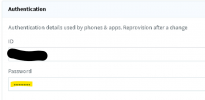
It worked with:

User ==> extention
ID ==> Authentication ID
Password ==> Authentication password
 
  • Like
Reactions: ChrisC_3CX
Status
Not open for further replies.

Forum statistics

Threads
111,974
Messages
590,081
Members
164,899
Latest member
mazet