Registration fails unless transport type change from UDP to TCP

Status
Not open for further replies.

eddv123

Titanium Partner
Advanced Certified
Joined
Aug 15, 2017
Messages
2,855
Reaction score
478
I have had an issue recently that although fixed has baffled me as to what the problem could be caused by.

The 3CX System is in the cloud on Windows (Windows firewall off, updates done and antivirus policies configured as they should be)

The Phones are Yealink T46S (66.83.0.55 firmware) and are connected to 3CX via a VPN connection (software PFSense Firewall).

The site in question has been up and stable for a good few years and last week all phones dropped registration to 3CX but the VPN stayed up.
In this state the Yealinks couldn't register but could still (from the phones interface) ping 3CX and a traceroute went across the same route.

After rebooting, resetting, restarting services, nothing solved the problem, it was only off the back of another issue I recall from some time ago that I tried
changing the transport type from UDP to TCP - instantly the first phone registered and the others after this (after having to log into each one manually and change for a quick fix option).

The concern now is that in this state a re-provision of a phone will set it back to UDP and thus de-register the phone so I need to understand if there is a better fix option. I can write a custom template to solve this however would like to keep the system in a supported configuration setup.

Firewalls I am aware are more friendly to TCP traffic than UDP traffic (due to the nature in which TCP works) but the point still remains that I have never had to change the transport method before and the issue has occurred after the system has been live and working for quite some time.

I ran a PCAP from the endpoint in both TCP and UDP modes and the only difference I could see what in the REGISTER packet (attached screenshot comparison) is that the TCP source port is different to UDP although I cannot see why this would make a difference.

Would be very keen to hear from anyone who has experienced such an issue before and what they did to solve (other than what I have already mentioned). I have the full PCAP available but would rather not post it on a public forum.

 

Attachments

  • registration_headersTCP_UDP.jpg
    registration_headersTCP_UDP.jpg
    324.7 KB · Views: 65
I have had an issue recently that although fixed has baffled me as to what the problem could be caused by.

The 3CX System is in the cloud on Windows (Windows firewall off, updates done and antivirus policies configured as they should be)

The Phones are Yealink T46S (66.83.0.55 firmware) and are connected to 3CX via a VPN connection (software PFSense Firewall).

The site in question has been up and stable for a good few years and last week all phones dropped registration to 3CX but the VPN stayed up.
In this state the Yealinks couldn't register but could still (from the phones interface) ping 3CX and a traceroute went across the same route.

After rebooting, resetting, restarting services, nothing solved the problem, it was only off the back of another issue I recall from some time ago that I tried
changing the transport type from UDP to TCP - instantly the first phone registered and the others after this (after having to log into each one manually and change for a quick fix option).

The concern now is that in this state a re-provision of a phone will set it back to UDP and thus de-register the phone so I need to understand if there is a better fix option. I can write a custom template to solve this however would like to keep the system in a supported configuration setup.

Firewalls I am aware are more friendly to TCP traffic than UDP traffic (due to the nature in which TCP works) but the point still remains that I have never had to change the transport method before and the issue has occurred after the system has been live and working for quite some time.

I ran a PCAP from the endpoint in both TCP and UDP modes and the only difference I could see what in the REGISTER packet (attached screenshot comparison) is that the TCP source port is different to UDP although I cannot see why this would make a difference.

Would be very keen to hear from anyone who has experienced such an issue before and what they did to solve (other than what I have already mentioned). I have the full PCAP available but would rather not post it on a public forum.

I experienced this same issue, it was due to our subnet being outside of RFC. If you uncheck "Disallow use outside on LAN" does the phone register as expected?
 
@Rhys Haskell

Thanks for the reply, both the 3CX PBX and local LAN that the phones reside on are both within the subnets recommended by the RFC's: 10.0.0.0/8,169.254.0.0/16,172.16.0.0/12,192.168.0.0/16

Although that is a nice tip for the future. I would be interested to know if your issue was apparent straight away or emerged after a period of time.
 
@Rhys Haskell

Thanks for the reply, both the 3CX PBX and local LAN that the phones reside on are both within the subnets recommended by the RFC's: 10.0.0.0/8,169.254.0.0/16,172.16.0.0/12,192.168.0.0/16

Although that is a nice tip for the future. I would be interested to know if your issue was apparent straight away or emerged after a period of time.

The issue was there all of the time. Nigex was blocking UDP requests over the VPN as it was seeing it as a public IP.
 
This is definitely not what we are experiencing here as this has only recently occurred on a system which has been up for at least a couple of years. I do believe however that like you the network is at fault here.

What I would ideally like (and I am sure I will be told to raise it on the ideas site) is the ability to toggle between TCP/UDP on the extension (like you can do with the 3CX App) "SIP Transport".
 
Last edited:
Hi @eddv123
Maybe silly question, but just in order to make sure:
You have taken traces both for UDP and TCP, both on the Yealinks' side (e.g. by mirroring their switchport) and on the 3cx server side, correct?
I would be curious to see if the REGISTER requests both over UDP and TCP actually reach the 3cx server and if the server's responses (40x and 200OK) reach back to the Yealinks.
If any of the above does not happen, I would suspect a Layer3-4 issue, rather than a Yealink-3cx issue.
 
You have taken traces both for UDP and TCP, both on the Yealinks' side (e.g. by mirroring their switchport) and on the 3cx server side, correct?

No, the Yealink phones support PCAP tracing from the GUI of their own interface - no mirror port required. The REGISTER receives no response from the server itself.

There have been a few strings on the forums before about phones going into this state but it is normally solved by rebooting the phone or manual reg-registering. I have never had to change transport types before.

I would agree that it is most likely a network issue (Layer 3/Firewall) however the network provider has confirmed no changes have been made - in fact the person responsible for changes has been on holiday.
 
Hello @eddv123

You will need to run a capture both on the Yealink interface and the PBX at the same time to catch a register message in UDP. You should check if the message reaches the PBX and if the PBX responds correctly and the to the correct IP and port. That will give you a pretty good idea where the issue is and why this is failing.
 
@YiannisH_3CX I have the PCAP from the phone but not the PBX so will get this.

Just out of interest in the meantime have you had any similar reports on the 3CX Support desk ?
 
Just out of interest in the meantime have you had any similar reports on the 3CX Support desk ?
I do remember seeing a similar case a while back but it ended up being a network issue.
 
I do remember seeing a similar case a while back but it ended up being a network issue.

I am absolutely confident that it will be, however would be surprised with such a change in behaviour when told that no configuration changes have been made on the network. I will be tracing the PBX today so will update and let you know what the result is.
 
The issue was there all of the time. Nigex was blocking UDP requests over the VPN as it was seeing it as a public IP.

I think you mean nginx (the web server) but that wouldn't have anything to do with registration. Nginx only handles the web traffic.
 
A little more information on this after doing further testing.

I can turn from UDP to TCP (Which causes a registration success) and after switch back to UDP and retain a successful registration to the PBX.

So thoughts are (and I would welcome some constructive feedback) that it is something like a stale connection across the VPN or a timer or something like that?

It is definitely not the tunnel failing/dropping or even TCP/UDP it's to do with the SIP connections across the tunnel itself.
 
I am also having this issue - with yealink t41s. I have to set the transport type to TCP for it to register, otherwise it would fail with UDP.

TCP & UDP port 5060 is open. Hosted on DigitalOcean, fresh installation of 3CX v16 Pro Trial. Latest firmware version on the handsets.

I'm trying to create a custom template (from a copy), but I'm alittle unsure as to what I need to change to make TCP the default transport type?
 
I had a similar issue on my 3CX Client for iOS.

the issue was the SIP Transport SSL certificate had disappeared on my 3CX and I had to get this back via reinstallation of 3CX.
 
I had a similar issue on my 3CX Client for iOS.

the issue was the SIP Transport SSL certificate had disappeared on my 3CX and I had to get this back via reinstallation of 3CX.
I'm using 3CX's FQDN (which has the SSL).
 
I'm using 3CX's FQDN (which has the SSL).

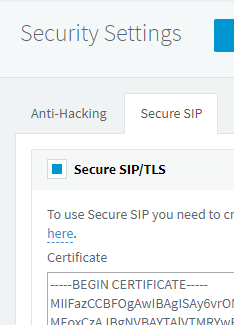
Mine was too. If you look at Security > SSL do you see the certificate in there or is it blank? Mine was blank like the cert had been removed.
 
@eddv123

We just resently had a case where 3 x T48G sporadic lost the ability to hear voice when picking up the call. Setting the Call on Hold, and picking the call up again fixed the sound (as there was sent a new invite).
We did a lot of tracing on the 3CX and on the Yealink phones, had 3CX and Yealink support to look at it, but nothing seem wrong. We updated the Phones with newer Firmware, but this dident solve the issue ether.

We sendt a T48S to the location and this phone dident have the problem. The T48S came with the Factory Firmware 66.82.0.30. We downgraded the firmware on the existing T48G´s and all problems are now solved on those phones as well.

Seems that the "Forced" FW xx.83.0.55 was the cause of our problems. Unfortunately we are not able to play with the FW upgrades / downgrades on the location (a FireDepartment with lots of calls), but perhaps you could try to go way back in Firmware, and then update one at the time to see if the issue could be solved?
 
Mine was too. If you look at Security > SSL do you see the certificate in there or is it blank? Mine was blank like the cert had been removed.
This is what I see:
6a1af820ded27d9914c94571e0a1e173.png
 
Status
Not open for further replies.

Forum statistics

Threads
111,923
Messages
589,752
Members
164,796
Latest member
Dame24