


- Joined
- Feb 27, 2024
- Messages
- 6
- Reaction score
- 1
Due to a RAID crash on my vmWare ESXi server, the data containing my server was lost. And stupid me I do not have any server backup.
I have rebuilt the RAID with new drives, and am reinstalling the 3CX server. It initially took 3 attempts using the provided ISO to get it installed, but now it is installed and ready. However, when asking for the SetupConfig.xml file, I provide the link from my portal and it gives an error "Invalid option selected".
The server is located on premise, using a custom domain.
When viewing the XML file, I fear that the error is this section:
<option>
<code>NeedFqdn</code>
<answer>no</answer>
</option>
<option>
<code>Hostname</code>
<answer>pbx-*removed for security*-nl</answer>
</option>
<option>
<code>DnsSuffix</code>
<answer>a-gl</answer>
</option>
<option>
<code>DomainGroup</code>
<answer>Other</answer>
</option>
<option>
<code>HasLocalDns</code>
<answer>no</answer>
</option>
When I run the SetupConfig.xml through the console instead of the Web version, I get the following:
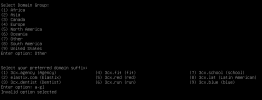
It is simply not allowing me to use a custom FQDN using the config received from 3CX portal. Even though the "NeedFqdn" is set to no, it is still running the script as if I need a FQDN from 3CX. Is there any way around this? I have been at it now for about 6 hours.
I have rebuilt the RAID with new drives, and am reinstalling the 3CX server. It initially took 3 attempts using the provided ISO to get it installed, but now it is installed and ready. However, when asking for the SetupConfig.xml file, I provide the link from my portal and it gives an error "Invalid option selected".
The server is located on premise, using a custom domain.
When viewing the XML file, I fear that the error is this section:
<option>
<code>NeedFqdn</code>
<answer>no</answer>
</option>
<option>
<code>Hostname</code>
<answer>pbx-*removed for security*-nl</answer>
</option>
<option>
<code>DnsSuffix</code>
<answer>a-gl</answer>
</option>
<option>
<code>DomainGroup</code>
<answer>Other</answer>
</option>
<option>
<code>HasLocalDns</code>
<answer>no</answer>
</option>
When I run the SetupConfig.xml through the console instead of the Web version, I get the following:
It is simply not allowing me to use a custom FQDN using the config received from 3CX portal. Even though the "NeedFqdn" is set to no, it is still running the script as if I need a FQDN from 3CX. Is there any way around this? I have been at it now for about 6 hours.


