• We do not provide troubleshooting help for unsupported phones. Please try with a supported phone.
  • V20 Update 10 Alpha 2 Learn more

Unsupported Relay not triggering through 3CX

Status
Not open for further replies.

Ollycuff

New User
Joined
Jan 29, 2022
Messages
17
Reaction score
2
Hello,

I have a Akuvox intercom on 3CX and I have programmed the key number 6 when pressed to release the relay on the Akuvox intercom. This was working up until I have introduced the SIP trunk and now it doesn't work but I have even restored my backup before I introduced the SIP trunk and it still doesn't work but it 100% did work. I have used another sip phone just a stand alone system and this works fine so the problem ls something to do with 3CX blocking the command.
Does anybody have any idea what I may have to do?

Thanks

Olly
 
Does it work if you press 6 manually Instead of using the key when you are connected to the intercom

You sure you programmed the key as dtmf code ?
 
Not sure what you mean by press 6 manually?
I have programmed the DTMF code on the intercom webpage but I haven't programmed anything on the 3CX as originally it did just work but now it doesn’t. Is there something I need to do on 3CX?

Thanks

Olly
 
Normal procedure when to release a relay on an intercom, you would answer the call on the phone and then to open the door you would press a key (in this case 6) - does this work.

Is the intercom ringing a 3cx extension and does this work ? If so try pressing 6 on the call to release the call.
 
Yes this is what I want and it did work but now doesn’t. Yes the intercom is calling a 3CX extension.
I used a standard sip phone connected to the intercom and that works so the issue is with 3CX.
Any ideas?
 
When you say it work and now does not - please explain in more.

When the phone ring and you answer it , does pressing 6 on the phone release the door ?

What type of phone are you using ?
 
So when the intercom rings the extension I would answer on my phone through the 3CX app and press 6 on the keypad and the relay would trigger on the intercom.
It’s stopped working since I added the sip trunk.

What is happening now is when I press 6 it does not release the door.

If I turn off sip trunk it still doesn’t work.

Even if I answer on the 3CX app it doesn’t work.

Is there anything which needs programming on 3CX?

I’m using Akuvox intercom.

Thanks

Olly
 
So when the intercom rings the extension I would answer on my phone through the 3CX app and press 6 on the keypad and the relay would trigger on the intercom.
It’s stopped working since I added the sip trunk.

What is happening now is when I press 6 it does not release the door.

If I turn off sip trunk it still doesn’t work.

Clearly then the SIP trunk is unrelated, it was probably a random occurrence. SIP trunks are not involved at all for internal (extension to extension) calls.

Akuvox is not a supported device - I think therein lies the problem.

Supported phones use RFC2833 to process DTMF. If your device has the DTMF option for this protocol, then switch it to that and it should probably work fine. If not, you might have to consider either troubleshooting it yourself or getting a supported device that has already been tested to work.
 
The intercom does support RFC2833,
This did work so it can be done it’s just stopped a few days later after being up and running.
If I was to share a trace on wire shark would this help to fix the problem?

Thanks

Olly
 
Hi Olly,

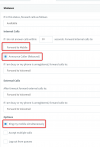
One important question - have you enabled any of the below highlighted options on the extension that belongs to the Akuvox?

1644237509107.png
 
Hi
It wasn’t but I have configured this and it makes no difference. Is there anything else what I could try? When I had it working I didn’t program anything on the 3cx.

Thanks

Olly
 
Hi Olly,

In this case, the best I can recommend is the following, just to take you back to a clean slate:

1. Create two fresh extensions - do not change any of their settings at all - leave them default
2. Factory reset your doorphone to forget any changes you made in it and go back to defaults too
3. If the manufacturer offers new firmware, now is the time to update it
4. Delete your 3CX app from your phone or PC
5. Now provision the app, and the the door phone (manually as you did before) and try again to see if the behavior changes when everything is using the default settings.

This is just to make sure it didn't stop working due to any unforeseen changes you may have made along the way.

But again keep in mind that for unsupported devices, we cannot provide assistance or guarantee that they will always work as needed. If it doesn't work you will have to troubleshoot further on your own.
 
Ok thank il try.
 
  • Like
Reactions: JohnS_3CX
Hi Olly,

In this case, the best I can recommend is the following, just to take you back to a clean slate:

1. Create two fresh extensions - do not change any of their settings at all - leave them default
2. Factory reset your doorphone to forget any changes you made in it and go back to defaults too
3. If the manufacturer offers new firmware, now is the time to update it
4. Delete your 3CX app from your phone or PC
5. Now provision the app, and the the door phone (manually as you did before) and try again to see if the behavior changes when everything is using the default settings.

This is just to make sure it didn't stop working due to any unforeseen changes you may have made along the way.

But again keep in mind that for unsupported devices, we cannot provide assistance or guarantee that they will always work as needed. If it doesn't work you will have to troubleshoot further on your own.
Hello,
OK i have found the problem, it seems to be when calling an external line it doesn't work but if you call a mobile which is on 4G on the 3cx app it works, so it appears to be external numbers where it doesn't work.
Any idea what this might be?

Thanks

Olly
 
Sounds like a DTMF issue on your sip trunk.
 
Sounds like a DTMF issue on your sip trunk.
I have had the SIP trunk company look into this and they have said its all good on their side. You can hear the keypad tone on the intercom so it is receiving the tone.
 
If , for some reason, audio DTMF is being sent, along the way. then check that you do not have a low bit rate Codec in use. They can cause issues when trying to send audio DTMF.
 
Hello,
OK i have found the problem, it seems to be when calling an external line it doesn't work but if you call a mobile which is on 4G on the 3cx app it works, so it appears to be external numbers where it doesn't work.
Any idea what this might be?

Thanks

Olly

Definitely a trunk issue I would say. While we have made many improvements on the way trunks handle DTMF, ultimately you are also dependent on how your provider handles it, but also how the provider of the calling side handles it.

This means that even if your provider is 100% perfect, the failure can still happen from the other side that sent the call to your provider.

One example is if the mobile carrier does not detect the DMTF sent from a GSM phone call, fails to convert it to RFC2833, and all the doorphone hears is an in-band tone of low quality. Such a low quality audio sample might not be enough for your doorphone to detect the tone, even if you yourself can hear it.

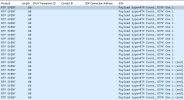
You can start a capture on your trunk, replicate the issue, then open the capture in Wireshark.
Type the filter rtpevent and press enter. If you don't see something like this, then it means you never received any keypresses on your trunk in the first place. Ensure that no other calls are being made during the capture so you don't see any traffic from other extensions etc. 1644307372004.png
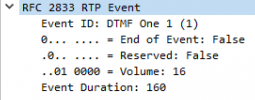
Packet details:
1644307485865.png


Hope this helps!
 
Definitely a trunk issue I would say. While we have made many improvements on the way trunks handle DTMF, ultimately you are also dependent on how your provider handles it, but also how the provider of the calling side handles it.

This means that even if your provider is 100% perfect, the failure can still happen from the other side that sent the call to your provider.

One example is if the mobile carrier does not detect the DMTF sent from a GSM phone call, fails to convert it to RFC2833, and all the doorphone hears is an in-band tone of low quality. Such a low quality audio sample might not be enough for your doorphone to detect the tone, even if you yourself can hear it.

You can start a capture on your trunk, replicate the issue, then open the capture in Wireshark.
Type the filter rtpevent and press enter. If you don't see something like this, then it means you never received any keypresses on your trunk in the first place. Ensure that no other calls are being made during the capture so you don't see any traffic from other extensions etc. View attachment 27743
Packet details:
View attachment 27744


Hope this helps!
Hello, thank you for providing this information and assisting me. I have done the above and it seems I have the same capture as you above so I the dtmf signal is being sent!.
just a note - if I call the intercom with my mobile phone the relay will trigger by pressing 6! but if the intercom call my mobile phone it doesn't work!
anything else I should now look into?
 
And what codec is set as the first choice (so, for originating calls), on the intercom?
 
Last edited:
Status
Not open for further replies.

Forum statistics

Threads
112,147
Messages
590,959
Members
165,167
Latest member
Finatra.us