Remote Console

Status
Not open for further replies.

petewatterschats

Joined
Jan 19, 2016
Messages
151
Reaction score
0
is there a remote Console capability for the 3CX server and if so what URL do I use from a remote computer to access it.

Thanks
 
It depends what port is set-up to access 3CX. Usually, if you didn't select anything else, it will probably be 5000. (check the location bar, in your browser when you access the server locally) It could be one of several others depending on how you wish to get in, and how secure you wish to make it.

See the port list...

http://www.3cx.com/blog/docs/ports-used/

Which ever port you choose to use, it will have to be forwarded in the router, to the IP of the server. If you use a router with VPN capability, you could also gain access through that.

Be sure that your system password is something hard to guess.
 
I look at the status bar and substituted the actual IP address for the DNS name

https: //172.16.145.1:5001/management/MainForm.wgx

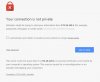
I get a "privacy error message" see attached
 

Attachments

  • privacy error message.JPG
    privacy error message.JPG
    38.6 KB · Views: 551
petewatterschats said:
I get a "privacy error message"
This is because you use a self-signed certificate when you install 3CX.
You may proceed to login into the system.
 
Got it thanks
 
Status
Not open for further replies.