Solved Remote control not working

Status
Not open for further replies.

Alphabetic

3CX MVP
Silver Partner
Advanced Certified
Joined
Jul 1, 2016
Messages
6,571
Reaction score
2,582
Hi All,

Im testing remote control using Google Chrome.

It keeps telling participant to download and install the software (which i've done) but it still wont work.
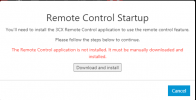
1622040739951.png
 
I've had it before. It didn't work because the computer's user name was written in Russian letters.
 
I've had it before. It didn't work because the computer's user name was written in Russian letters.
Thanks but my username isnt russian.
 
Thanks but my username isnt russian.
Make sure Chrome is up-to-date and that no antivirus or firewall blocks the plugin. I've seen that before.
 
after installation there should be a service been added called "3CX WebMeeting Remote Control" in the state "running", can you confirm this is the case?
 
@kieferschild are you already on v18 a4?
We detected an issue with the latest windows update when you have local admin rights.
A fixed version is already uploaded to v18 video conferencing (restart once the gateway service to get the fix directly), the version for v16 web meeting is on the way.
 
@kieferschild are you already on v18 a4?
We detected an issue with the latest windows update when you have local admin rights.
A fixed version is already uploaded to v18 video conferencing (restart once the gateway service to get the fix directly), the version for v16 web meeting is on the way.
Im on the latest build of v16 and can confirm the service is started.
 
for v16 the update is on the way, I will let you know when it is available.
 
for v16 the update is on the way, I will let you know when it is available.
Does this mean no remote control at the moment?

No workaround?
 
For v18 is already solved for all users, for v16 it only causes an issue with a small subset of users.

We drilled it down to users with admin right and/or Hyper-V role installed (or WSL for Docker). This blocks a range of Socket port in the 6XXX range which the remote control app uses.

Code:
netsh interface ipv4 show excludedportrange protocol=tcp

The update simply places the socket in a non-affected port. The update will be shipped today also for v16.
 
For v18 is already solved for all users, for v16 it only causes an issue with a small subset of users.

We drilled it down to users with admin right and/or Hyper-V role installed (or WSL for Docker). This blocks a range of Socket port in the 6XXX range which the remote control app uses.

Code:
netsh interface ipv4 show excludedportrange protocol=tcp

The update simply places the socket in a non-affected port. The update will be shipped today also for v16.
Great, i'll wait for the update.

I do indeed having hyperv running on my PC.
 
update is been shipped, if you will start a new remote session, it will prompt you to update the client.
Let me know how it is going
 
update is been shipped, if you will start a new remote session, it will prompt you to update the client.
Let me know how it is going
Works perfect thanks!
 
  • Like
Reactions: NickD_3CX
Status
Not open for further replies.

Forum statistics

Threads
111,973
Messages
590,077
Members
164,896
Latest member
sameage