remote hardphone without the soft client

Status
Not open for further replies.

tranceaddict

Joined
Jan 5, 2009
Messages
17
Reaction score
0
Is it possible to setup remote hard phones to connect to the 3CX server that is reachable on the internet... I have read the tutorial that says its required to run the soft client for proxy but that sort of defeats the purpose if you have remote employees who will now need to have a system running the software? Any advice or clarification on this... This is possible with Trixbox and I am trying to decide whether I stick with 3CX or switch..
 
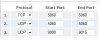
Yes there is no difference between a hardphone and a softphone, just set the correct DNS up and port forwarding. If in doubt, create a VPN connection back to the network hosting the 3CX server. As long as the port forwarding has been done on the server, i.e. SIP TCP 5060 then you should be fine. You'll have to check the complete port forwarding requirements though. I have a hardphone connecting in remotely without issue. Hope that helps, Lewis
 
Lewis..Thanks for the prompt response... I guess as the 3CX software has changed the tutorials have not kept up..I think they are referring to setup on an older version system...which required a soft client running to act as a proxy. So I will attempt to make this work remotely first using the soft client and then attempt with a hard phone...I have local extensions working.. By the way.. are you using a "direct connect" for remote client or are you using a tunnel... If I could impose on you for a few pointers or quick step by step setup, I shall be greatful.

Thanks.
TA
 
Good idea to test and get the softphone working remotely on a VPN and without a VPN first before you start to use the IP Hard Phone.

I used the VPN primarily, although I gradually weened myself to coming in across the Internet - although you need to ensure you have the correct port forwarding on your router. The IP Hard Phone should be no different from the the softphone in principle provided you have correctly specified:

SIP Proxy Server i.e. your WAN IP Address or a FQDN if you have access to add an A Record on your DNS
Username and Password
Firewall Correctly configured

Make sure you check the Server Activity Log as this is very useful in seeing extension checking in and diagnosing problems.

I actually have some users using a VPN tunnel, simply because they have lan-to-lan VPN tunnels configured. I tend to not use the VPN and come in across the WAN just for breadth of testing - and of course this option is better as it removes the VPN dependency which is great for mobile sales people who may connect from various locations.

Hope that is useful, it is simple, but I must admit I spent a lot of time testing before I got it right. Here is a screenshot of my port forwarding rules on our Draytek Router for completeness.


Good luck

Lewis
p.s. Which IP Hard Phones are you using out of interest ? My experience so far has been with a Grandstream, although I will be experimenting with Linksys SPA 942's shortly.
 

Attachments

  • router.jpg
    router.jpg
    9.5 KB · Views: 3,223
Thanks for the quick guide.,..It was as envisioned...What was troubling me was that even though I had not forwarded the ports initially, the firewall checker in the SCX managment console passed all the port testing with out an error.. This was troublesome to me because I had not added any such exceptions in my firewall.. Checking my firewall log confirmed this as it was not allowing any traffic on these ports.

Subsequently I have opened the ports and now will start testing...

I added a CNAME record to my DNS service provider for sip.mydomain.com which is pointing to my http://www.mydomain.com Since the A record is already set for mydomain.com.. this resolution seems to work without having to dedicate a separate IPaddress to a another A record just for the SIP box. I am running the 3CX on a server that is running other servers as well.... I have since checked the URL and it is reachable from the outside.. So Iam about to test the soft phone..

I haven't yet taken a plunge with buying any hardphones yet...wanted to get the PBX going first before spending any money...I like the Snom's but they are spendy...I think I will het the Snom for the main office and get the cheaper 1 line phones for the remote branches.
 
tranceaddict said:
I guess as the 3CX software has changed the tutorials have not kept up..I think they are referring to setup on an older version system...which required a soft client running to act as a proxy.
TA
Hi, TA

I'm confused :oops: Which tutorials you're refering? Because, as far as I know, the 3CX Phone Client is required, as a "proxy", only for Outlook integration - then, indeed, it should be connected to a PBX, set to work in "desktop mode", and then it will act as a proxy between Outlook and the PBX. But, otherwise, according to this topic's subject, 3CX Voip Client's presence is not required to allow any other phone to connect the PBX - it would be a little weird, isn't? :mrgreen:

vali

P.S. 3CX Voip Client is bundled with a tunnel but, again, this one is not required by any other phone.
 
Last edited by a moderator:
ndl said:
tranceaddict may well be refering to this one http://www.3cx.com/support/3cx-tunnel.html "How can I use the 3CX Tunnel with a SIP hardphone?"

Which I tried to use with version 6 and failed to get working.
Hi, ndl

I understand now.
Is important to know that the 3CX Voip Client package has two applications, the client and the tunnel. In the case we discuss, the client is required to run only to setup and tune its tunnel, after that it might be closed, since the tunnel continues tu run in background as a service.

Basically, the procedure is simple: start the client, set a tunneled connection to a 3CX PBX, check connection is working (999 for instance) and then you may close the client - I mean close, not minimize in tray. The IP/port you specified in the client's "use tunnel of host" field is the setting you should specify as a proxy for any phone - hard or soft - on the local network to connect them to the same PBX through the tunnel. (Of course, the IP should not be 127.0.0.1)

vali
 
Hi ...Well If I understand you correctly, you are suggesting that you use the client to setup the tunnel. However, once you setup the tunnel and close the client, the tunnel service is running on the PC that you installed the client on so that the PC can act as a proxy.

This is what I was alluding to as a problem...If what you are stating is correct then that requires that the "PC" on which the tunnel service is running stay on. Otherwise you will lose your connection to your remote PBX. This is why I think this solution for remote extensions is not really practical because it requires additional hardware and software (a PC and the tunnel) service to run for a remote extension to work.

Iam interested in running remote extensions without the need for additional hardware and software...Just SIP phones directly connected to the 3CX PBX server over the internet. I don't want to setup VOIP providers for a VOIP trunk...Just extensions remotely talking to each other. Perhaps you guys can help me get this going.

I have been playing around with this and over the last week or so I have had the following results

I can connect to my PBX remotely from anywhere.
Here is what how I am testing this before buying hard phones.

Nokia N810 with SIP client connecting to my 3CX server remotely
IPhone with Fring SIP client connecting to my 3CX server remotely
Laptop with Xlite SIP client connecting to my 3CX server remotely

For some odd reason after working for a while...Now when I call the SIP extension on myN810 , it rings once, the devices connect and then disconnect with a busy signal. The Server activity log shows that the devices connect but the call is terminated because of busy status... Any idea why this is happening?
 
Okay... AS a follow-up I have discovered that you have to have ports 9000-9049 open for both TCP and UDP traffic for the call to go through... I still haven't yet gotten audio to go from one device to the other...
I'll keep working and post later...

Okay...Now I am really scratching my head... Opening the firewall for certain ports and Forwarding those ports to certain internal IP addresses are 2 different things...

Can somebody clarify which ports are just supposed to be open on the firewall while which ones are actually supposed to be forwarded to the 3CX server

I have ports 5060-5060 UDP/TCP opened and forwarded to the 3CX server
I have ports 9000-9049 UDP/TCP opened and forwarded to the 3CX server
I have ports 3478-3478 UDP opened and forwarded to the 3CX server...

Does this mean that if you have any device on the local network, it will not function since all the traffic on those ports is routed to the 3CX server..


Keep in mind that since Iam testing remote extensions... Iam connecting to the 3CX server using its public domain name and not internal IP address but Iam doing this from the internet connection from within the network...Perhaps that is why i am having all the trouble?

Thanks!
 
Another option would be to use a Snom 370 at the remote locations as they have an inbuilt VPN client to allow a connection back to the head office.

They may be a bit more pricey but they should keep your overall support time and associated costs down

http://www.snom.com/sv/products/snom-370-voip-phone/

John
 
Matt,
Iam still doing my softphone testing using SIP clients. So far I have the following scenarios working:

- Softphone client connecting to local 3CX server as local extension
- Can receive calls from local extensions: Inbound and outbound audio works
- Can receive calls from remote extensions: inbound and outbound audio works
- Can receive calls from external PSTN phones: Inbound and outbound audio works

- Softphone client connecting to remote 3CX server as remote extension
- Can receive calls from local extensions: Inbound and outbound audio works
- Can receive calls from remote extensions: inbound audio DOES NOT WORK but outbound audio works
- Can receive calls from external PSTN phones: Inbound audio DOES NOT WORK but outbound audio works

This inbound audio problem is really puzzling because I have tried the softphone with and without the proxy server setting. Since Iam connecting to the 3CX server remotely Iam using the following for the registration and proxy server address:
Registration server: sip.mydomain.com Port 5060
Proxy Server: sip.mydomain.com Port 5060

Any ideas...Iam really dumfounded at this point!

Thanks!
 
Try forwarding the UDP 7000-70?? range of ports defined in 3CX Settings > Network > Ports from external to the 3CX server.
I had to do this in one situation to get two-way audio working even though it says you don't need to.
 
Thanks... I'll try that this evening and report back.

Cheers!
TA
 
Okay another update on my trials and triangulations in getting remote extensions working using standard SIP phones

First here is my port forwarding setup on my router/firewall based on suggestions from people on this forum and thread:

3478:3478 UDP forwarded to 3cx Server
5060:5060 UDP/TCP forwarded to 3cx server
5090:5090 UDP/TCP forwarded to 3CX server
9000:9049 UDP/TCP forwarded to 3CX server
7000:7499 UDP forwarded to 3CX server

Can I get some feedback on whether this is what others have as well

Secondly, now I have the following situation:

Extension [email protected] has a valid phone number assigned to it.

Logging on to 102 from inside the network as a local extension
1) Can receive Inbound calls on extension and can make outbound calls
2) Inbound and outbound audio works

Loggin on to 102 from inside the network as a remote extension
1) Can make out bound calls without any problem with inbound and outbound audio working flawlessly
2) Inbound calls from an outside number get to the server but disconnect after 1 ring and then a busy tone. My sip phone shows a missed call.

Please note the following
------------------------------------------------------------------------------------------------
192.168.0.70 is the internal IP of the 3CX box
192.168.0.50 is the internal IP of my SIP softphone
ExternalIPaddressofmysipserver is masked to protect my true IP for purpose of this post
sip.mydomain.com is masked to to protect my true domain for the purpose of this post
The external number I have assigned to my 102 is bound to an external sip server with the IP address of 66.54.140.46 (IPKALL SERVER)
So this call is really a SIP to SIP call even though I am dialing a number from the outside.

THIS PROBLEM ONLY HAPPENS WHEN LOGGED ONTO THE 3CX BOX AS A REMOTE EXTENSION USING THE PUBLIC DOMAIN NAME OF THE 3CX BOX
-------------------------------------------------------------------------------------------------

Below is the activity log from the server

15:45:16.828 [CM503008]: Call(6): Call is terminated
15:45:16.828 [CM503015]: Call(6): Attempt to reach <sip:[email protected]> failed. Reason: Busy
15:45:16.828 [CM503003]: Call(6): Call to sip:[email protected] has failed; Cause: 486 Busy Here; from IP:externalIPaddressofmysipserver:49267
15:45:16.421 [CM505001]: Ext.102: Device info: Device Not Identified: User Agent not matched; Capabilities:[reinvite, replaces, able-no-sdp, recvonly] UserAgent: [Telepathy-SofiaSIP/0.5.4 sofia-sip/1.12.8] Transport: [sip:192.168.0.70:5060]
15:45:16.421 [CM503002]: Call(6): Alerting sip:102@externalipaddressofmysipserver:49267;transport=udp
15:45:16.390 [CM505001]: Ext.102: Device info: Device Not Identified: User Agent not matched; Capabilities:[reinvite, replaces, able-no-sdp, recvonly] UserAgent: [] Transport: [sip:192.168.0.70:5060]
15:45:16.390 [CM503002]: Call(6): Alerting sip:[email protected]:49267
15:45:16.359 [MS210006] C:6.4:Offer provided. Connection(by pass mode): 66.54.140.46:16714(16715)
15:45:16.296 [MS210004] C:6.3:Offer provided. Connection(proxy mode): 192.168.0.70:7012(7013)
15:45:16.296 [MS210004] C:6.2:Offer provided. Connection(proxy mode): 192.168.0.70:7010(7011)
15:45:16.281 [CM503004]: Call(6): Calling: Shared:Ext.102@[Dev:sip:[email protected]:49262, Dev:sip:[email protected]:49267, Dev:sip:102@externalipaddressofmysipserver:49267;transport=udp]
15:45:16.281 [CM503010]: Making route(s) to <sip:[email protected]>
15:45:16.281 [MS210000] C:6.1:Offer received. RTP connection: 66.54.140.46:16714(16715)
15:45:16.281 Remote SDP is set for legC:6.1
15:45:16.281 [CM505001]: Ext.Unknown: Device info: Device Not Identified: User Agent not matched; Capabilities:[reinvite, replaces, able-no-sdp, recvonly] UserAgent: [] Transport: [sip:192.168.0.70:5060]
15:45:16.281 [CM503001]: Call(6): Incoming call from Sip.Unknown to <sip:[email protected]>
15:45:16.109 [CM500002]: Info on incoming INVITE:
INVITE sip:[email protected] SIP/2.0
Via: SIP/2.0/UDP 66.54.140.46:5060;branch=z9hG4bK74f31a43;rport=5060
Max-Forwards: 70
Contact: <sip:[email protected]>
To: <sip:[email protected]>
From: "Unknown"<sip:[email protected]>;tag=as493f2b9e
Call-ID: [email protected]
CSeq: 102 INVITE
Allow: INVITE, ACK, CANCEL, OPTIONS, BYE, REFER, SUBSCRIBE, NOTIFY
Date: Sun, 18 Jan 2009 20:45:14 GMT
Supported: replaces
User-Agent: Asterisk PBX
Content-Length: 0


My hope is that someone from 3CX reads this post in detail because I think this is a bug in 3CX. I am using a generic SIP softphone based on SIP standards to test this scenario before buying hardphones.

Thanks for all the guidance so far and I feel Iam very close at this point to getting this all sorted.

TA
 
Hello,

Maybe a stupid question, but why don't you setup a VPN between your 2 locations?
I did the exact same thing over here.
Just made a LAN TO LAN connection between my 2 Routers, and now I can use the phone's and pc's etc. just as if they are on the local lan.
Safes a lot in securing your outer network side as well :)

Maybe this can work for you as well?
 
Status
Not open for further replies.

Latest Posts

Forum statistics

Threads
111,885
Messages
589,547
Members
164,744
Latest member
johnblackwood1