


- Joined
- Mar 10, 2010
- Messages
- 254
- Reaction score
- 10
My system is on the lowest end of resources but it's been running great every since linux was supported. However, I thought I would experiment with enabling remote storage backup. Once everything was configured, I saw the folders get created on my FTP server. Then I changed the schedule in 3cx so it would run in the next minute, 8:53. Shortly after the system went down.
I thought this might be normal so I waited and waited, and still nothing. I didn't see any activity on the FTP server either. Eventually I felt like I had to reboot a little after 10 minutes which I did via SSH.
I assumed the backup is made local first and then it delivers to FTP, and so the load on system resources woudln't be any higher than a standard backup.
I tried to reproduce this by setting the schedule to run within 5 minutes and this time nothing happened. No obvious change in system resource and again no FTP activity, and nothing from today in /var/lib/3cxpbx/Instance1/Data/Backups
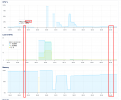
As a final test, I performed a manual backup by pressing the "Backup Now" button. The backup took maybe a few seconds. I monitored system resources and there was virtually zero change in resources. If I zoom on the time period, we're talking .3%, 1.3"% to 1.6% usage. and after seeing the email notification. I saw the FTP activity and zip file
I will set the backup time back to 10pm like normal and come back tomorrow with an update, but I'm not particularly hopeful at the moment.
Call logs 600MB
Chat log 400kB
Event log 5MB
PBX Logs 830MB
I thought this might be normal so I waited and waited, and still nothing. I didn't see any activity on the FTP server either. Eventually I felt like I had to reboot a little after 10 minutes which I did via SSH.
I assumed the backup is made local first and then it delivers to FTP, and so the load on system resources woudln't be any higher than a standard backup.
I tried to reproduce this by setting the schedule to run within 5 minutes and this time nothing happened. No obvious change in system resource and again no FTP activity, and nothing from today in /var/lib/3cxpbx/Instance1/Data/Backups
As a final test, I performed a manual backup by pressing the "Backup Now" button. The backup took maybe a few seconds. I monitored system resources and there was virtually zero change in resources. If I zoom on the time period, we're talking .3%, 1.3"% to 1.6% usage. and after seeing the email notification. I saw the FTP activity and zip file
I will set the backup time back to 10pm like normal and come back tomorrow with an update, but I'm not particularly hopeful at the moment.
Call logs 600MB
Chat log 400kB
Event log 5MB
PBX Logs 830MB


