Solved Replacing audio prompts not working

Status
Not open for further replies.

Dream24

Customer
Joined
Apr 2, 2022
Messages
15
Reaction score
1
Hello everyone,

I am trying to change the audio prompt of message recording (record_your_message.wav )from English to a local language and I followed the steps in the documentation/ on the forum but to no avail. In fact, the file has been changed (If I click play by phone, the prompt is the local language) but when I dial the shortcode and choose the option of recording the message, the system still plays the original prompt.

Any help would be much appreciated.

Thanks.
 
Hello everyone,

I am trying to change the audio prompt of message recording (record_your_message.wav )from English to a local language and I followed the steps in the documentation/ on the forum but to no avail. In fact, the file has been changed (If I click play by phone, the prompt is the local language) but when I dial the shortcode and choose the option of recording the message, the system still plays the original prompt.

Any help would be much appreciated.

Thanks.
Have you restarted the services?
 
Hello everyone,

I am trying to change the audio prompt of message recording (record_your_message.wav )from English to a local language and I followed the steps in the documentation/ on the forum but to no avail. In fact, the file has been changed (If I click play by phone, the prompt is the local language) but when I dial the shortcode and choose the option of recording the message, the system still plays the original prompt.

Any help would be much appreciated.

Thanks.
Have you restarted the services?
Hi,

Thanks for the reply. Yes, I have restarted the services many times. No matter what I do I am unable to change the English audio prompt.
 
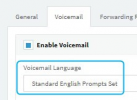
Also, since you're trying to edit the voicemail greeting, do also make sure that the extension you want this to apply to is using the edited system prompt:

Users/Extensions >> Edit >> Voicemail:
1649061970936.png
 
  • Like
Reactions: Evolute IT
Also, since you're trying to edit the voicemail greeting, do also make sure that the extension you want this to apply to is using the edited system prompt:

Users/Extensions >> Edit >> Voicemail:
View attachment 29206
Hello @ChrisC_3CX,

Thank you so much for the reply, this did the trick for me. It is now working the way I wanted it.

Thank you all again for the help. You are amazing!
 
  • Like
Reactions: ChrisC_3CX
Glad to hear you managed to get this sorted!

Feel free to start a new thread should anything else come up!
 
Status
Not open for further replies.

Forum statistics

Threads
111,974
Messages
590,081
Members
164,899
Latest member
mazet