


- Joined
- Mar 28, 2024
- Messages
- 4
- Reaction score
- 1
Hello All,
I am hoping someone can help me here.
We have recently changed how our inbound call routing occurs on our main phone line.
The process as it goes:
The issue we are seeing is that some calls are going through each of the steps, but once reaching RG Overflow 2.1 and not being answered, the call just ends.
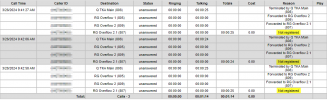
This is not happening with every call. I have tested with my own personal phone and it goes into the loop as intended.
What does the Not registered reason mean?
How do I stop calls ending due to being Not registered?
Is there a better way to set this up? Please bear in mind we are on a Professional License, so Skill Based Routing is not available. Enterprise licensing is outside of our companies price range.
We have a team of staff in the Call Queue that are scheduled to be answering calls. If the call is not answered during this time, it goes to the RG Overflow 1, which includes the team in the Call Queue and some additional staff. RG Overflow 2 and 2.1 have the RG Overflow 1 staff, plus additional staff.
RG Overflow 2.1 was created as Ring Groups would not allow a loop from RG Overflow 2 back onto itself.
I am hoping someone can help me here.
We have recently changed how our inbound call routing occurs on our main phone line.
The process as it goes:
- Call Queue for 24 seconds and Rings All, if not answered then to
- Ring Group called Overflow 1 and Rings All for 15 seconds, then if not answered to
- Ring Group called Overflow 2 and Rings All for 15 seconds, then if not answered to
- Ring Group called Overflow 2.1 and Rings All for 15 seconds, then if not answered it goes back to
- Ring Group called Overflow 2 in a loop.
The issue we are seeing is that some calls are going through each of the steps, but once reaching RG Overflow 2.1 and not being answered, the call just ends.
This is not happening with every call. I have tested with my own personal phone and it goes into the loop as intended.
What does the Not registered reason mean?
How do I stop calls ending due to being Not registered?
Is there a better way to set this up? Please bear in mind we are on a Professional License, so Skill Based Routing is not available. Enterprise licensing is outside of our companies price range.
We have a team of staff in the Call Queue that are scheduled to be answering calls. If the call is not answered during this time, it goes to the RG Overflow 1, which includes the team in the Call Queue and some additional staff. RG Overflow 2 and 2.1 have the RG Overflow 1 staff, plus additional staff.
RG Overflow 2.1 was created as Ring Groups would not allow a loop from RG Overflow 2 back onto itself.


