Solved Reporting on Call Flow Apps

Status
Not open for further replies.

MaxL

Customer
Joined
Sep 21, 2021
Messages
50
Reaction score
12
I am attempting to run a call log report which specifies when a call flow app receives a call. I input the extension of the CFA into the "To" field, and it returns no results. When my call flows apps receive a call, the call log reports it as "ext.123()" rather than just a 3 digit extension.

Is there any way to just report what calls have been directed to a call flow app in a given day. I would even settle for when one of our DIDs receives a call.
 
Last edited:
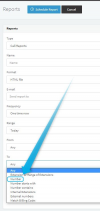
I believe using the "Number" filtering option should give you the desired results:
1648036118648.png
 
That doesn't seem to work either. Below is a snip from our call log of what an incoming call looks like for that number. We have an inbound rule set to transfer any calls from that number to a call flow app with the extension 405
tempsnip.png
 
I just tested again to be honest and it works fine:

1. CID catches incoming callers Caller ID and routes to Call Flow App 898

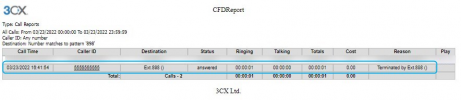
2. Call shows in call log as:
1648046653478.png

3. Generated Call Report with "TO:" set to "Number" and value 898:
1648046681678.png


Is this what you're doing too?

Also, what version PBX are you running, is it the latest v18.0.3.461?
 
I can see how it worked on your end. I can see the query you entered was "number matches pattern" in the to field. This wont work for us because there are instances where there may be that same 3 digit number in other unrelated calls going to different areas. for example, we may get a call that goes to a number 123-405-6789, which would also appear on that report but not be relevant to the type of calls we are looking for.
 
I just tested but could not replicate the behavior you're describing. I tested with calls to numbers that contain 898 and still cannot get those calls in the call report when generated as mentioned above. Just so that I better understand the situation, can you provide a screenshot of the:
1. Call Report Settings (before generated)
2. Call Report (after generated)
3. and call log showing both CFD and unrelated calls

Also, how did you place calls to numbers containing dashes? Our apps should automatically remove symbols from destination numbers so normally you should not see calls to numbers with symbols in them in the call log.
 
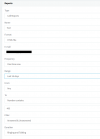
Here is what I have. Apologies for all the redacted info, we have some strict rules on hiding internal personal information.

This is the settings I used to generate the report.
Capture.PNG

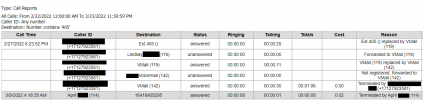
This is a snippet of what the report gave me. As you can see, the first entry is giving me information I would like to see, but the second entry is unrelated call information from a completely different number.
Capture1.PNG

Here is also what I see if I search for "305" from the "call log" tab. The first and third entry are information I am looking for while the second one is unrelated.
Capture2.PNG
 
Can you try changing the filter type to "Number" instead of "Number Contains"?
1648050798482.png
 
It looks like that worked. Changing the to field to "Number" and entering 405 yielded the results I was looking for. Thanks for the help!
 
Excellent! My pleasure!

Do feel free to let us know if you need anything else!
 
Status
Not open for further replies.

Forum statistics

Threads
111,974
Messages
590,081
Members
164,899
Latest member
mazet