Restoring Backups

Status
Not open for further replies.

RESOLVE-WR

Silver Partner
Basic Certified
Joined
Mar 28, 2023
Messages
25
Reaction score
2
Hi there,

I'm in the process of trying to test upgrading from v18 to v20 for our internal 3CX Hosted tenant. I've created a trial tenant, and exported the config from our current server.

1. How do I upload this to my test tenant?
2. Once restored, will it amend the FQDN, inbound calls etc? I'd prefer it didn't amend the FQDN and the test stays as it's own FQDN, as i'd like to keep it as a test tenant.

Thanks,
 
The backup in version 20 requires the FQDN to be in the backup, so this would hijack your configuration and activation.
 
Hi there,

The backup is in v18 and we have the test tenant on v18 also. Will this overwrite the FQDN also?
 
Please do not use the same FQDN and subscription on multiple machines. This will cause issues down the line. As a partner of 3CX we do provide you with 2 NFR keys. Please use one as your production, and the 2nd one as your testing environment.
 
Hi Nichloas,

That's exactly what I've done... resolve for main and robertstesting is the test environment... My question is I want to restore the backup in Resolve to RobertsTesting, so I can test the upgrade from v18 to v20 in RobertsTesting.

1. How do I upload this to my test tenant?
2. Once restored, will it amend the FQDN, inbound calls etc? I'd prefer it didn't amend the FQDN and the test stays as it's own FQDN, as i'd like to keep it as a test tenant.
 
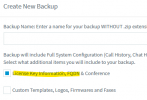
On a v18 server you can uncheck this option:
1710430231093.png
You can change the location then restore from FTP etc.
 
  • Like
Reactions: RESOLVE-WR
Steve,

Many thanks for this. :)
 
Status
Not open for further replies.

Forum statistics

Threads
111,973
Messages
590,079
Members
164,898
Latest member
grahamaskew