"Ring All" Call Groups returning "Call forbidden by administrator."

Scott EIT

Bronze Partner
Basic Certified
Joined
Jan 29, 2019
Messages
209
Reaction score
18
This is on v20. 3CX SMB Free 10. Install Type StartUP.

Hi folks, we're running into an issue with call groups on a specific client's setup. Inbound calls are routed to a main menu receptionists, where options 1, 3 and 4 are forwarded to different call groups. Said call groups will not function if set to "Ring All" mode, instead returning with "Call forbidden by administrator" and ending the call. Option 2 forwards the call to an extension, which works fine. Additionally, prioritized hunt mode appears to work just fine as well.

Also of note, all the users in this setup are exclusively using the mobile app. There are no physical phones set up. The event log unfortunately doesn't mention anything about this problem. I can also see in the call reports that, upon calling through to the ringgroup, the PBX looks like it trying to call the mobile numbers of the users, which fails instantly with reason "Route disabled." We've also tried adding a second SIP trunk to test and using that, which results in the same problem.

While prioritized hunt is a work around, ideally we'd like to get "Ring All" working again.

Any advice on this would be appreciated.

Kind regards,
 
Could you, for every user in your ring group, disable the option 'ring my mobile simultaneously' and let us know if that fixes it?
Then we can of course look into the how and why of that.
(BTW, the option should not be needed since you say they all have the 3CX app anyway)
 
Could you, for every user in your ring group, disable the option 'ring my mobile simultaneously' and let us know if that fixes it?
Then we can of course look into the how and why of that.
(BTW, the option should not be needed since you say they all have the 3CX app anyway)
Having done that, seems to work fine - though we need to test it a bit more before we can say for sure.
Any idea why that might be the case?
 
This could be anything. Your event log would show you why a call failed.

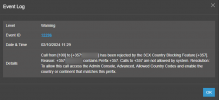
An example:

1727878754191.png

This call was blocked specifically because the country code for Cyprus was not selected.
 
As I said, the event log doesn't detail anything about why these calls are failing. On V18 I'd change it to Verbose logging mode, but that doesn't appear to be an option anymore. There's certainly nothing on the Dashboard to adjust that.
 
As I said, the event log doesn't detail anything about why these calls are failing. On V18 I'd change it to Verbose logging mode, but that doesn't appear to be an option anymore. There's certainly nothing on the Dashboard to adjust that.
The Activity log is not available on the SMB platform for the tenants. To have the activity log available, you would need to have a dedicated instance.
 
Just a quick update:
We've managed to get this resolved via Noord's suggestion above.

We then ran into issues with users unable to make outbound calls, which we resolved by completely clearing out the Outbound rules setup and setting up one main outbound rule from scratch.

Next problem with this instance - the client wants all calls from 3CX to be routed to the 3CX app, rather than calling their mobile directly. This was the case while the old outbound rules were set up, but as we've redone them, that's since been reverted.

Currently, all calls are being routed directly to the user's mobile, rather than routing through the user's 3CX app. This is making it difficult for the client to tell between work calls and non-work calls.

Any suggestions on configuration to resolve this?

Thanks,
 
Calls to the 3CX Apps do not require any outbound rules to be set.

Just have the app installed on their mobile and provisioned to their extensions.

You may need to reconfigure their forwarding rules to not send the calls to their mobile phone number though.
 
Hi Nicholas,

I can only assume the previous outbound rule setup was somehow blocking routing to the mobile numbers, and that's why it directed the call to the mobile app instead.

However, having removed those, it's now routing directly to the mobile and not to the app. As far as I'm aware, everything is provisioned correctly, and on the 3CX Desktop app the users are displayed as Available.

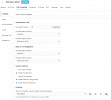
I've attached a screenshot of the forwarding rules for an extension I've confirmed is seeing this behaviour. As far as I can tell, nothing is telling the system to route to the mobile instead of the app. The only thing I can think is that the user has set their own settings and unchecked "Accept PUSH notifications" but I'm not 100% sure.

Thanks,
 

Attachments

  • Extension Forwarding Rules.PNG
    Extension Forwarding Rules.PNG
    33.3 KB · Views: 5
That is the forwarding rules only for one profile.

What about the other profiles? What about any exceptions to send the calls to their mobile number?

Ultimately, you would have to look into the logs to see why the call is going to their mobile phones.
 
  • Like
Reactions: Evolute IT
Hi Nicholas,

Apologies, I should have clarified - this setup is mirrored across all the extensions. It's the same setup for all of them.

Checking the call log, it simply lists the destination as the Extension, not the mobile number. As discussed above, the event log gives nothing of use, and I don't have access to activity log as this is SMB. Not sure if there's anywhere else I can check to see what's going on on the backend?

Thanks,
 

Forum statistics

Threads
111,954
Messages
589,922
Members
164,852
Latest member
priya