Solved 'Ring my mobile simultaneously' internal calls not forwarded to mobile

Status
Not open for further replies.

nrgyz

Customer
Joined
Jan 21, 2021
Messages
5
Reaction score
3
Hello,

I have some remote workers who hates the 3cx softphone and they don't bother installing a physical phone at home. No big deal, some of them already have a MS Teams phone system license so they can be reached directly with a phone number and others just use their company cell phone (not 3cx app). However, I setup their extension under 3CX, set their mobile number under user information and enabled 'Ring my mobile simultaneously'.

When someone from outside our organisation call in, dial the extention number, the call along with the originator CID is being transfered to the mobile number! Great!!!

But... When an internal 3CX user try to reach an extension where 'Ring my mobile simultaneously' is enabled, the call does not reach the cell phone. The outgoing trunk is setup with Voip.ms. This provider is now enforcing valid Caller IDs (10 digits long CID for NA calls) for all calls they terminate. In the provider's call log I see that 3CX is using "123" <123> as the CID instead of the Outbound Caller ID setup on the trunk. 123 is the extention number of the caller.

Any ideas??
 
The problem is going to be distinguishing between an external call, where you want to leave the digits as-is, and an internal call. I suppose you have tried a DID number in the calling extensions outside caller ID.
You might play around with outbound caller ID manipulation. to try changing the extension number into a valid PSTN number. The only other thing i can think of, is creating a separate trunk group to Voip.ms, just for the users mobile numbers, if you don't have too many. You should be able to specify the caller ID as the "main number" on those calls. Of course, that is going to show on all calls to those mobiles.
 
Hi @nrgyz

If you are using the default Voip.ms template included in the PBX and you made no changes to it then the PBX should not be sending the internal extension number to the provider.
I think that when looking at the activity log you are seeing the invite from the extension to the PBX and not the Invite from the PBX to the provider.
I would start by checking your outbound rules and making sure you have an outbound rule that matches the call you are trying to make.
 
Hi @nrgyz

If you are using the default Voip.ms template included in the PBX and you made no changes to it then the PBX should not be sending the internal extension number to the provider.
I think that when looking at the activity log you are seeing the invite from the extension to the PBX and not the Invite from the PBX to the provider.
I would start by checking your outbound rules and making sure you have an outbound rule that matches the call you are trying to make.
Hi @YiannisH_3CX

Originally when I set up the Voip.ms trunk I followed this guide. When I added the trunk I selected VoIP.ms as "Provider in your Country". Is that what you mean by using the default Voip.ms template included in 3CX?

In fact, those calls are reaching the Voip.ms provider. When going into my Voip.ms customer portal, I can see the failed call in the call log. The call is being REJECTED because of invalid CallerID. 3CX is passing a 3 digits long CID instead of a 10 digits long CID as expected by Voip.ms.

In my Voip.ms account settings, if I change the CallerID setting from "I use a system capable of passing its own CallerID" to "Use a Custom CallerID" and specify our 10 digits long CID, then the call reaches my mobile users. This is undesirable because the originator CallerID is then lost, it get overridden by the one I set in Voip.ms. My users prefer to know who is calling from instead of seeing the company's main telephone number on incoming calls.

When looking at my 3CX activity log, I can see which outbound rule matches for this call.

Thanks for your help!
 
Hi @nrgyz

I think I misread something in your Original post so apologies for that. What you are actually experiencing is a known issue. When an internal extension calls another extension and the receiving extension has the "Ring my mobile simultaneously" option enabled then the extension number is sent as the Originator Caller ID.
What I would recommend is:
1. Convince your users that the 3CX client is good so the "Ring my mobile simultaneously" option is not required.
2. Set the extensions to use the forwarding rules differently.
2a. You can set the extensions to Away while the users are working from home and set the extensions to Forward to mobile. 2021-01-25_10h42_49.png

This will give you the correct behavior and all calls will be forwarded to the mobile number of the users.

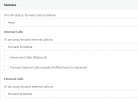
2b. Or you can leave the extensions to available with the "Ring my mobile simultaneously" option enabled and setup exception rules for internal calls while users are working from home.
2021-01-25_10h46_20.png
So external calls will follow the current configuration but all internal calls will be forwarded to the mobile number of the user.
 
Thank you @YiannisH_3CX! I followed *2b* to keep the "Ring my mobile simultaneously" and just added the exception rule 000-999 to forward to mobile and this time it works as expected! Nice!

Thanks again for the great support, I appreciate it!
 
  • Like
Reactions: YiannisH_3CX
You can also use our SBC to integrate Teams into your 3CX and bypass the outbound call through your SIP trunk, then they can dial 3CX extensions from their Teams app as well.
 
Glad I could help
 
Status
Not open for further replies.

Latest Posts

Forum statistics

Threads
111,990
Messages
590,161
Members
164,926
Latest member
tohoken1