Well, if it's a queue or ring-group you have configured on the DID, you can change the settings there. But you probably already saw that.
If it's routing to an extension, it's a bit more difficult.
If your office closes at 17:00, the extensions are still reachable after 17:00.
That wasn't the case in v18 (if you configured it like that).
There is this setting per extension:
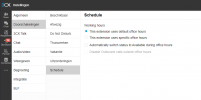
It seems to work together with this (in ADMIN):
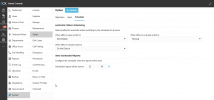
I haven't been able to figure out yet what it is supposed to do.
The Admin-settings suggest the Scheduler can automatically set certain extensions as 'away' at certain times.
This is similar to the Office Hours (but not 100%).
However, the setting in the extension only says 'set to available', so it will only use the scheduler to set an extension to available, not away.
And I'm also not sure: if you manually set your status to away because you're away for a few days - then the next morning it will be set to available again.
I believe some improvements / changes in this area would be welcome. Or I just don't understand what everything means exactly.
But a lot of users are struggling with the availability. It sometimes doesn't do what you'd expect.
You have these settings, but also the Teams Status integration, but also your Outlook Calendar.
And Teams Status works, but when you turn off you computer, Teams goes offline but 3CX will stay available forever. Which makes some sense, but also seems illogical. If you take a look at 'Team' (in 3CX) at 17:30, you see almost everybody is available, when in fact they have gone home 30 minutes ago.
It would also really help if the status-icon would return to the taskbar (on the 3CX app) and/or the notification-area icon. Or if it were visible on the phone. And for people without Teams-integration, the option for the 3CX-app to set your status to 'be right back' automatically when you're away from keyboard would be nice as well.
It just feel this entire area would need some additional thought and love from 3CX