Router phone working as SBC but no service on phone itself

Status
Not open for further replies.

qbitnetworking

Bronze Partner
Joined
Nov 28, 2020
Messages
138
Reaction score
30
Hi, I'm working with Yealink T53s and a T54W. I'm able to set one of the phones as the router phone/SBC and the other phones are able to provision off of it but the router phone itself says "No Service." All firmware are up to date. I've tried factory resetting multiple times, deleting and recreating the extension, using different phones/extensions as router, restarting all 3CX services. Whatever phone I set as router will show "No Service" but will show as an SBC to provision other phones off of.

I'm in the middle of the install right now and luckily one of the users is gone this week so I have her extension set as the SBC and all of the other phones are working off of it but as this rate, she won't have a working phone when she gets back.

Also tried downloading the config file from the Provisioning Link. When I choose "Save Link As" it says file is not available on site. When I click it, it says "Page cannot be found."

Thanks!
Jeremy
 
Is that phone set to use itself as the SBC, in 3CX? Had an issue once where it wasn't but it hadn't occurred to me to double check that (since it was a router phone and assigned to an extension).
 
  • Like
Reactions: qbitnetworking
Is that phone set to use itself as the SBC, in 3CX? Had an issue once where it wasn't but it hadn't occurred to me to double check that (since it was a router phone and assigned to an extension).
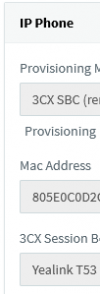
It shows up as an available phone to provision but the SBC selection is greyed out when I try to set it up.
 
Are there other phones on the same extension?
 
  • Like
Reactions: qbitnetworking
It shows up as an available phone to provision but the SBC selection is greyed out when I try to set it up.
Interesting, the GUI may have changed. I just brought up the phone I mentioned above, and in the management console I see this but the fields are disabled:
1702479905018.png
In the new admin console there is no SBC "routing device" choice for this one, only other phones. I set it up a while ago, don't recall exactly when.
 
  • Like
Reactions: qbitnetworking
Ive had this happen a few times. Factory reset it and set it up again.
 
Ive had this happen a few times. Factory reset it and set it up again.
I factory reset it multiple times. I even tried with multiple phones and factory resetting multiple times. My temporary solution had to be to set one of their least used phones as the SBC so now it’s serving at the router phone but it has no service.
 
Strange.. you on correct FW? IP isnt blacklisted and IP is static on the phone?
 
Strange.. you on correct FW? IP isnt blacklisted and IP is static on the phone?
Yup all firmwares were manually updated to 96.86.0.76 before I started provisioning them. I also made sure that there weren’t any new entries on the IP block list. I didn’t set the IP to static but it stayed the same the whole time I was trying to fix it.
 
You tried reapplying FW?
 
You tried reapplying FW?
I never tried that, no, but since it was happening on multiple phones (on multiple T53s and a T54W), I didn't think it was a firmware issue. It's whatever phone that is set as the router phone will not have service.
 
Strage that, i've got 3 of theses phones set up as SBC and they're all working

1702564710616.png
 
I think you'll have to stick the logging up on the handset and send the logs over to Yealink and see what they say.
 
Maybe some difference in phone hardware revision? Odd .76 works just fine for some.

Thinking about my process, the client connected the phones (behind an SBC), I updated them from 3CX, then deleted and re-added them as router phones.
 
Maybe some difference in phone hardware revision? Odd .76 works just fine for some.

Thinking about my process, the client connected the phones (behind an SBC), I updated them from 3CX, then deleted and re-added them as router phones.
I have working ones on other installs as well but they were set on earlier versions of the firmware and then upgraded to 96.86.0.76 so maybe that’s the only reason they are still working.
 
I had this issue and .74 also fixed it for me. Unfortunately, updating to .77 (which is out now) broke it again, so I'm having to run an "unsupported" firmware.
 
Status
Not open for further replies.

Members Online Now

Forum statistics

Threads
111,832
Messages
589,284
Members
164,662
Latest member
DejanMDS