- Joined
- Feb 5, 2024
- Messages
- 4
- Reaction score
- 0
Hello,
We've recently setup WhatsApp integration and I can receive and send messages.
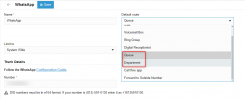
However when we change the call routing for the SIP trunk it has no effect - all messages still get sent to me.
If I change the call routing to another colleague they get the messages, but if we set it to a group without me in it and 2 of my colleagues in the group I still recieve the messages and they don't.
Can anyone help us configure this so we can send all incoming chats to a group
We've recently setup WhatsApp integration and I can receive and send messages.
However when we change the call routing for the SIP trunk it has no effect - all messages still get sent to me.
If I change the call routing to another colleague they get the messages, but if we set it to a group without me in it and 2 of my colleagues in the group I still recieve the messages and they don't.
Can anyone help us configure this so we can send all incoming chats to a group