- Joined
- Mar 29, 2024
- Messages
- 1
- Reaction score
- 0
We have some Yealink T41 devices, from a company we recently acquired. I tried to register one to our instance (v20). And the RPS request fails.
Every time I factory reset one it registers with the old RPS config after it goes online.
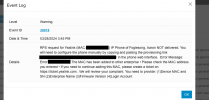
Log shows that "The MAC has been added to other enterprise • Please check the MAC address you entered • If you need to continue adding this MAC, please create a ticket on https://ticket.yealink.com . "
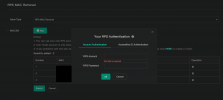
I followed the instructions to submit a ticket with Yealink, but it asks for an RPS Account and password at the end of the ticket submissions.
Not sure what login I'm supposed to use for that or if it is something 3CX has to submit for us?
I did manage to provision one by temporarily blocking from the internet, factory resetting it, then manually entering the provisioning details in the webgui for the device; but would prefer to not have to do that for all of them, and I'm not sure if that will cause issues in the future.
Any guidance or advice would be appreciated.
Every time I factory reset one it registers with the old RPS config after it goes online.
Log shows that "The MAC has been added to other enterprise • Please check the MAC address you entered • If you need to continue adding this MAC, please create a ticket on https://ticket.yealink.com . "
I followed the instructions to submit a ticket with Yealink, but it asks for an RPS Account and password at the end of the ticket submissions.
Not sure what login I'm supposed to use for that or if it is something 3CX has to submit for us?
I did manage to provision one by temporarily blocking from the internet, factory resetting it, then manually entering the provisioning details in the webgui for the device; but would prefer to not have to do that for all of them, and I'm not sure if that will cause issues in the future.
Any guidance or advice would be appreciated.